
Labels, fonts, alignment and wrapping
Align the text, not the widget
Abschnitt betitelt „Align the text, not the widget“position places the widget. horizontalAlignment and verticalAlignment place text inside that widget. Use the full canonical names in new examples; halign and valign remain compatibility spellings.
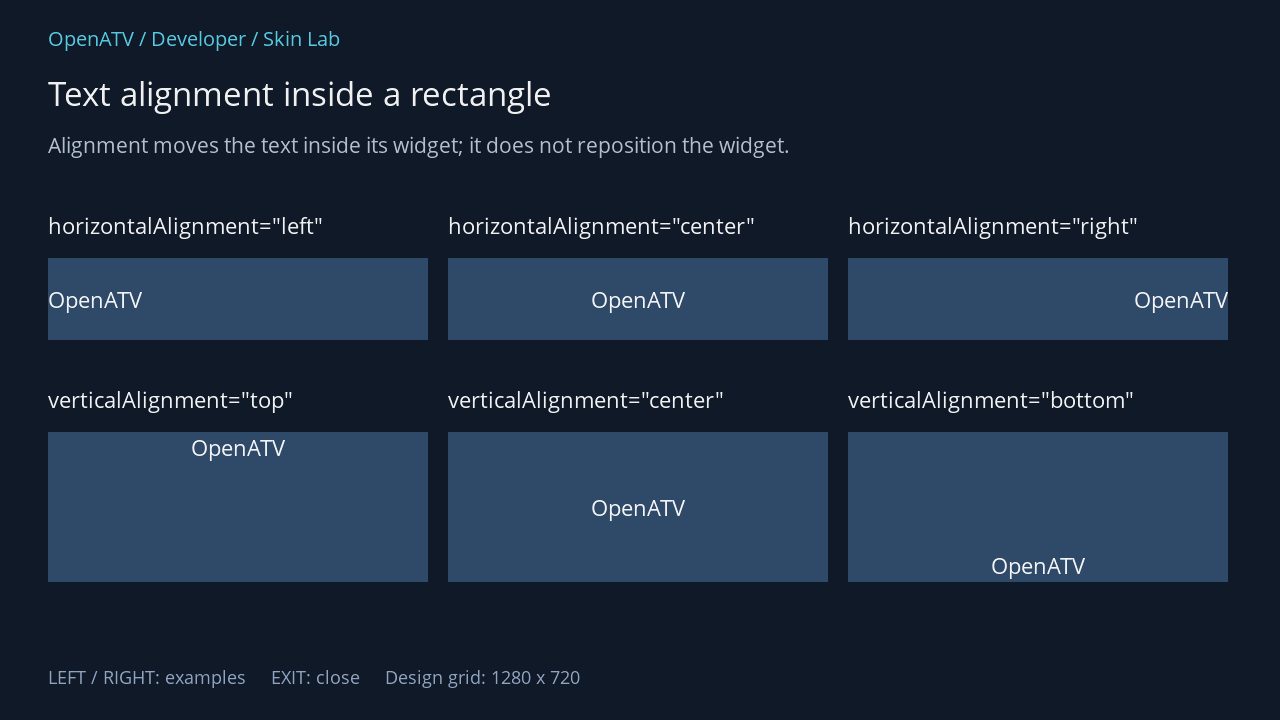
XML used for this result (inside the complete example screen):
<eLabel position="48,210" size="380,38" font="Regular;24" text='horizontalAlignment="left"' foregroundColor="#00FFFFFF" transparent="1" /> <eLabel position="48,258" size="380,82" font="Regular;24" text="OpenATV" foregroundColor="#00FFFFFF" horizontalAlignment="left" verticalAlignment="center" backgroundColor="#002F4968" /> <eLabel position="448,210" size="380,38" font="Regular;24" text='horizontalAlignment="center"' foregroundColor="#00FFFFFF" transparent="1" /> <eLabel position="448,258" size="380,82" font="Regular;24" text="OpenATV" foregroundColor="#00FFFFFF" horizontalAlignment="center" verticalAlignment="center" backgroundColor="#002F4968" /> <eLabel position="848,210" size="380,38" font="Regular;24" text='horizontalAlignment="right"' foregroundColor="#00FFFFFF" transparent="1" /> <eLabel position="848,258" size="380,82" font="Regular;24" text="OpenATV" foregroundColor="#00FFFFFF" horizontalAlignment="right" verticalAlignment="center" backgroundColor="#002F4968" /> <eLabel position="48,384" size="380,38" font="Regular;24" text='verticalAlignment="top"' foregroundColor="#00FFFFFF" transparent="1" /> <eLabel position="48,432" size="380,150" font="Regular;24" text="OpenATV" foregroundColor="#00FFFFFF" horizontalAlignment="center" verticalAlignment="top" backgroundColor="#002F4968" /> <eLabel position="448,384" size="380,38" font="Regular;24" text='verticalAlignment="center"' foregroundColor="#00FFFFFF" transparent="1" /> <eLabel position="448,432" size="380,150" font="Regular;24" text="OpenATV" foregroundColor="#00FFFFFF" horizontalAlignment="center" verticalAlignment="center" backgroundColor="#002F4968" /> <eLabel position="848,384" size="380,38" font="Regular;24" text='verticalAlignment="bottom"' foregroundColor="#00FFFFFF" transparent="1" /> <eLabel position="848,432" size="380,150" font="Regular;24" text="OpenATV" foregroundColor="#00FFFFFF" horizontalAlignment="center" verticalAlignment="bottom" backgroundColor="#002F4968" />Download complete alignment.xml · Download all examples and the test plugin
horizontalAlignment accepts left, center, right and block. verticalAlignment accepts top, center, middle (an alias of center) and bottom. Alignment is visible only when there is spare space inside the widget.
Choose a font and enough space
Abschnitt betitelt „Choose a font and enough space“font="Regular;28" selects a registered font face or alias and a design size. It does not point to Regular.ttf. A skin registers additional faces in <fonts> and may define aliases such as Body. Actual glyph metrics depend on the font file.
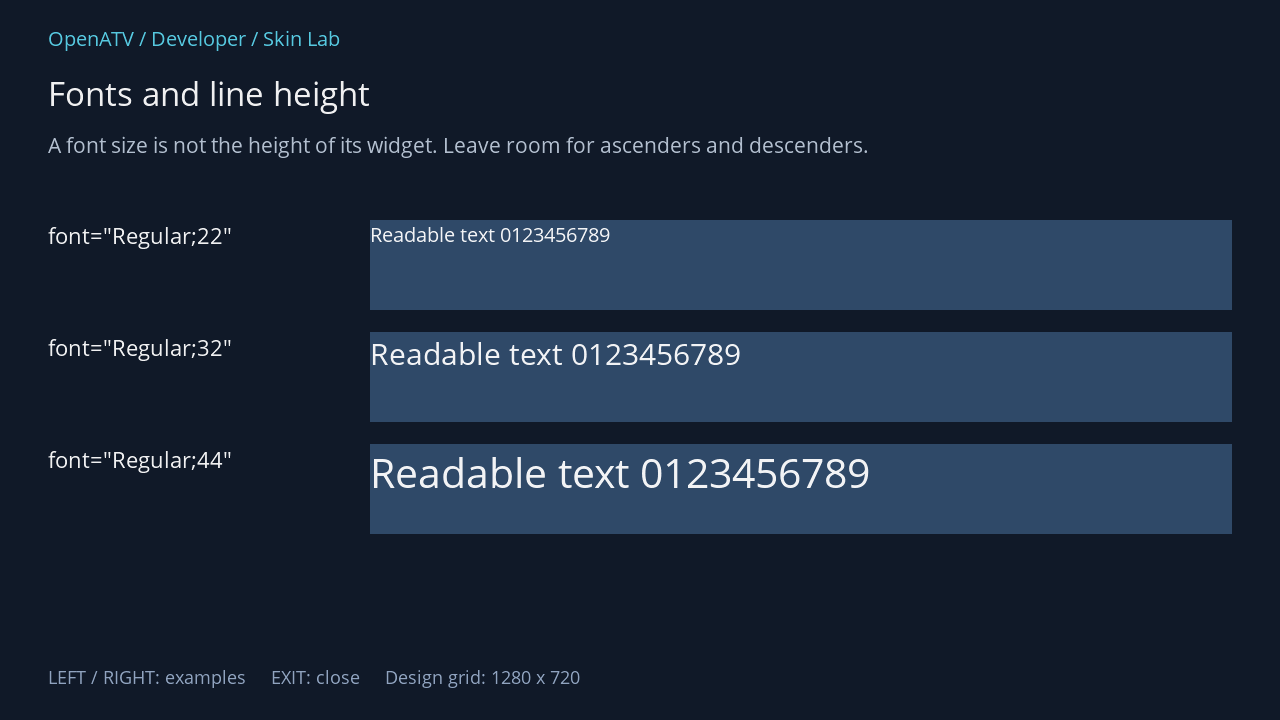
XML used for this result (inside the complete example screen):
<eLabel position="48,220" size="300,84" font="Regular;24" text='font="Regular;22"' foregroundColor="#00FFFFFF" transparent="1" /> <eLabel position="370,220" size="862,90" font="Regular;22" text="Readable text 0123456789" foregroundColor="#00FFFFFF" backgroundColor="#002F4968" /> <eLabel position="48,332" size="300,84" font="Regular;24" text='font="Regular;32"' foregroundColor="#00FFFFFF" transparent="1" /> <eLabel position="370,332" size="862,90" font="Regular;32" text="Readable text 0123456789" foregroundColor="#00FFFFFF" backgroundColor="#002F4968" /> <eLabel position="48,444" size="300,84" font="Regular;24" text='font="Regular;44"' foregroundColor="#00FFFFFF" transparent="1" /> <eLabel position="370,444" size="862,90" font="Regular;44" text="Readable text 0123456789" foregroundColor="#00FFFFFF" backgroundColor="#002F4968" />Download complete fonts.xml · Download all examples and the test plugin
Leave room for accents, descenders and multiple lines. Test real display text rather than relying only on a numeric font size. Unknown faces fall back through parseFont() and produce a log message; a silent visual difference may therefore be a missing font.
fontScale offers native label adjustment modes such as size;-4 and width;-4. This is separate from screen-resolution scaling. Do not use automatic shrinking to compensate for a consistently undersized layout.
Decide what happens to long text
Abschnitt betitelt „Decide what happens to long text“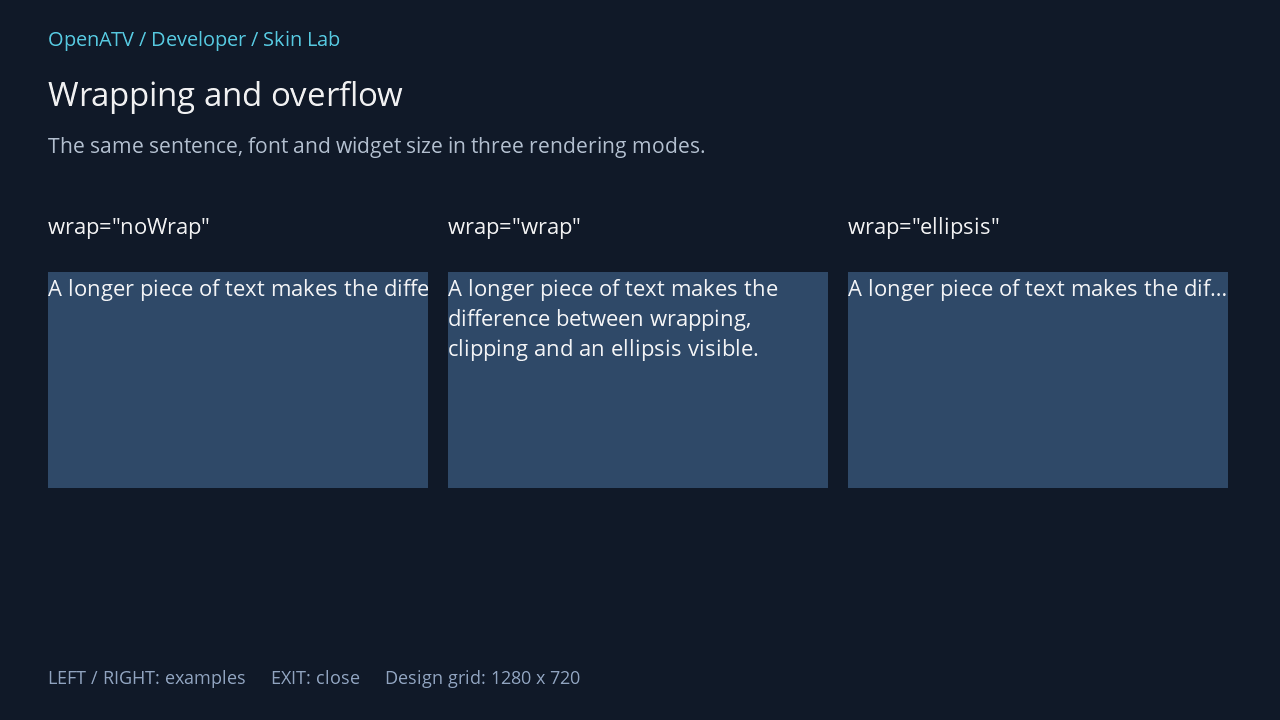
XML used for this result (inside the complete example screen):
<eLabel position="48,210" size="380,40" font="Regular;24" text='wrap="noWrap"' foregroundColor="#00FFFFFF" transparent="1" /> <eLabel position="48,272" size="380,216" font="Regular;24" text="A longer piece of text makes the difference between wrapping, clipping and an ellipsis visible." foregroundColor="#00FFFFFF" wrap="noWrap" verticalAlignment="top" backgroundColor="#002F4968" /> <eLabel position="448,210" size="380,40" font="Regular;24" text='wrap="wrap"' foregroundColor="#00FFFFFF" transparent="1" /> <eLabel position="448,272" size="380,216" font="Regular;24" text="A longer piece of text makes the difference between wrapping, clipping and an ellipsis visible." foregroundColor="#00FFFFFF" wrap="wrap" verticalAlignment="top" backgroundColor="#002F4968" /> <eLabel position="848,210" size="380,40" font="Regular;24" text='wrap="ellipsis"' foregroundColor="#00FFFFFF" transparent="1" /> <eLabel position="848,272" size="380,216" font="Regular;24" text="A longer piece of text makes the difference between wrapping, clipping and an ellipsis visible." foregroundColor="#00FFFFFF" wrap="ellipsis" verticalAlignment="top" backgroundColor="#002F4968" />Download complete wrapping.xml · Download all examples and the test plugin
| Attribute | Use |
|---|---|
wrap="wrap" |
Descriptions or explanations with enough height for multiple lines |
wrap="noWrap" |
Deliberately single-line content where clipping is acceptable |
wrap="ellipsis" |
A short single-line summary with an indication of missing text |
padding="12,8,12,8" |
Insets in left, top, right, bottom order; not CSS order |
shadowOffset="2,2" / shadowColor |
Offset shadow behind the glyphs |
textBorderWidth="1" / textBorderColor |
Explicit glyph outline |
widgetBorderWidth / widgetBorderColor |
Border around the widget rectangle |
The generic borderWidth/borderColor setters are overridden by eLabel to affect its text outline in this revision. Use the explicit textBorder* or widgetBorder* names to state your intention.
Scrolling text is configured with scrollText, for example direction=left,startDelay=1500,stepDelay=40,stepSize=2. It is a time-dependent effect, so the static gallery does not demonstrate its movement. See the parser reference for its option keys and verify the result on a receiver.
Underline a label or template field
Abschnitt betitelt „Underline a label or template field“Use underline="1" on a label and flags="underline" on a text item inside an XML list template. These are different parsing contexts. The underline recipe includes complete fragments, the default, a visual explanation and checks for insufficient height, clipping, custom drawing paths and older receiver builds.