
InfoBar signals, capabilities and status indicators
“Sensor” is a useful visual description, but these indicators come from different data models. Reception measurements, video properties, event metadata and recording state do not share one universal source.
Reception: three output contracts
Abschnitt betitelt „Reception: three output contracts“| Production source | Converter | Output / suitable consumer |
|---|---|---|
session.FrontendStatus |
FrontendInfo with SNR |
Text for Label; numeric value/range for Progress |
session.FrontendStatus |
FrontendInfo with SNRdB |
Text for Label |
session.FrontendStatus |
FrontendInfo with AGC |
Text or numeric bar; driver-dependent/possibly estimated |
session.FrontendStatus |
FrontendInfo with BER |
Error-count text; boolean means non-zero errors |
session.FrontendStatus |
FrontendInfo with LOCK |
Boolean for conditional visibility |
session.FrontendInfo |
FrontendInfo with TYPE |
Tuner type text; numeric type also exists for a compatible consumer |
session.FrontendInfo |
FrontendInfo with NUMBER |
Numeric slot index, not a ready-made label |
session.FrontendInfo |
FrontendInfo with STRING |
Formatted tuner-letter text |
session.FrontendInfo |
FrontendInfo with TUNERS |
Tuner letters with configurable idle/active/recording/disabled colours |
SNR and SNRdB text respects the user’s SNR display-swap setting, including a percentage fallback when dB is absent. The numeric SNR output uses range 65536. A printed percentage is a scaled receiver value, not a universally comparable RF measurement. In this source revision, AGC can be estimated from SNR when a frontend provides no useful AGC. Do not label that result as calibrated signal power.
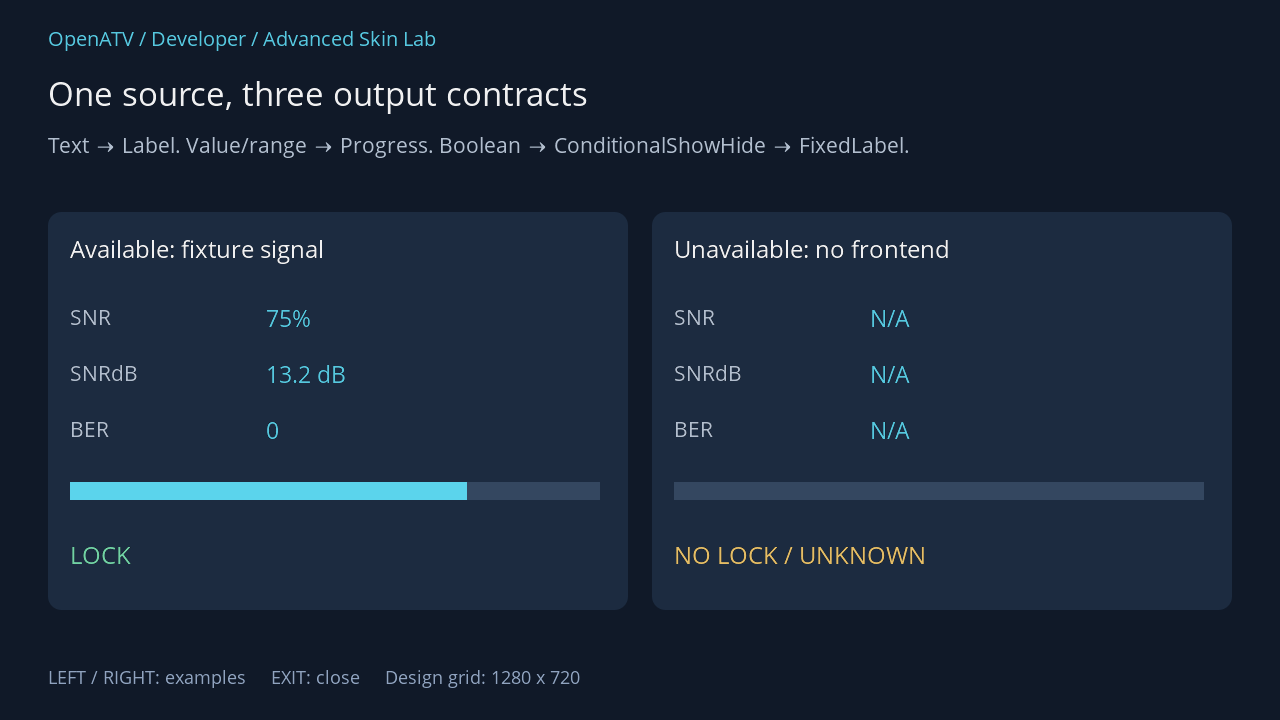
XML used for this result (inside the complete example screen):
<eRectangle position="48,212" size="580,398" backgroundColor="#001C2B40" zPosition="0" cornerRadius="14"/><eLabel position="70,232" size="534,44" font="Regular;26" text="Available: fixture signal" foregroundColor="#00FFFFFF" transparent="1" zPosition="2" /><eLabel position="70,302" size="150,38" font="Regular;23" text="SNR" foregroundColor="#00BDCADA" transparent="1" zPosition="2" />  <widget source="available" render="Label" position="266,302" size="300,38" font="Regular;25" foregroundColor="#005BD4EC" transparent="1" zPosition="2"><convert type="FrontendInfo">SNR</convert></widget><eLabel position="70,358" size="150,38" font="Regular;23" text="SNRdB" foregroundColor="#00BDCADA" transparent="1" zPosition="2" />  <widget source="available" render="Label" position="266,358" size="300,38" font="Regular;25" foregroundColor="#005BD4EC" transparent="1" zPosition="2"><convert type="FrontendInfo">SNRdB</convert></widget><eLabel position="70,414" size="150,38" font="Regular;23" text="BER" foregroundColor="#00BDCADA" transparent="1" zPosition="2" />  <widget source="available" render="Label" position="266,414" size="300,38" font="Regular;25" foregroundColor="#005BD4EC" transparent="1" zPosition="2"><convert type="FrontendInfo">BER</convert></widget>
  <widget source="available" render="Progress" position="70,482" size="530,18" foregroundColor="#005BD4EC" backgroundColor="#00344760" borderWidth="0" zPosition="2"><convert type="FrontendInfo">SNR</convert></widget>  <widget source="available" render="FixedLabel" position="70,538" size="500,44" font="Regular;26" text="LOCK" foregroundColor="#0078DFAD" transparent="1" zPosition="2"><convert type="FrontendInfo">LOCK</convert><convert type="ConditionalShowHide" /></widget>  <widget source="available" render="FixedLabel" position="70,538" size="500,44" font="Regular;26" text="NO LOCK / UNKNOWN" foregroundColor="#00F3C86A" transparent="1" zPosition="2"><convert type="FrontendInfo">LOCK</convert><convert type="ConditionalShowHide">Invert</convert></widget><eRectangle position="652,212" size="580,398" backgroundColor="#001C2B40" zPosition="0" cornerRadius="14"/><eLabel position="674,232" size="534,44" font="Regular;26" text="Unavailable: no frontend" foregroundColor="#00FFFFFF" transparent="1" zPosition="2" /><eLabel position="674,302" size="150,38" font="Regular;23" text="SNR" foregroundColor="#00BDCADA" transparent="1" zPosition="2" />  <widget source="unavailable" render="Label" position="870,302" size="300,38" font="Regular;25" foregroundColor="#005BD4EC" transparent="1" zPosition="2"><convert type="FrontendInfo">SNR</convert></widget><eLabel position="674,358" size="150,38" font="Regular;23" text="SNRdB" foregroundColor="#00BDCADA" transparent="1" zPosition="2" />  <widget source="unavailable" render="Label" position="870,358" size="300,38" font="Regular;25" foregroundColor="#005BD4EC" transparent="1" zPosition="2"><convert type="FrontendInfo">SNRdB</convert></widget><eLabel position="674,414" size="150,38" font="Regular;23" text="BER" foregroundColor="#00BDCADA" transparent="1" zPosition="2" />  <widget source="unavailable" render="Label" position="870,414" size="300,38" font="Regular;25" foregroundColor="#005BD4EC" transparent="1" zPosition="2"><convert type="FrontendInfo">BER</convert></widget>
  <widget source="unavailable" render="Progress" position="674,482" size="530,18" foregroundColor="#005BD4EC" backgroundColor="#00344760" borderWidth="0" zPosition="2"><convert type="FrontendInfo">SNR</convert></widget>  <widget source="unavailable" render="FixedLabel" position="674,538" size="500,44" font="Regular;26" text="LOCK" foregroundColor="#0078DFAD" transparent="1" zPosition="2"><convert type="FrontendInfo">LOCK</convert><convert type="ConditionalShowHide" /></widget>  <widget source="unavailable" render="FixedLabel" position="674,538" size="500,44" font="Regular;26" text="NO LOCK / UNKNOWN" foregroundColor="#00F3C86A" transparent="1" zPosition="2"><convert type="FrontendInfo">LOCK</convert><convert type="ConditionalShowHide">Invert</convert></widget>
Download complete signals.xml · Download all examples and the test plugin
Conditional labels and icons
Abschnitt betitelt „Conditional labels and icons“Use FixedLabel when the label’s text is fixed in XML and the chain only decides whether it is visible. A regular Label expects upstream text, which a lock boolean does not provide.
<widget source="session.FrontendStatus" render="FixedLabel" position="40,210" size="150,36" font="Regular;22" text="LOCK" foregroundColor="#0078DFAD" transparent="1"> <convert type="FrontendInfo">LOCK</convert> <convert type="ConditionalShowHide" /></widget>ConditionalShowHide accepts Invert, Blink and a numeric blink interval in milliseconds, separated by commas; for example Blink,1000. Use blinking sparingly for meaningful active states. The converter treats an unavailable boolean as false. Inverting it therefore means false or unknown, not proof of a measured failure.
For a PNG status icon, the corresponding pattern is a Pixmap renderer with a pixmap and the same boolean/visibility chain. For a static font glyph, use FixedLabel with an icon font and a Unicode character.
Service information and capabilities
Abschnitt betitelt „Service information and capabilities“These use session.CurrentService, not a frontend source. The following are useful ServiceInfo tokens from the pinned implementation.
| Tokens | Meaning / use |
|---|---|
VideoInfo, VideoWidth, VideoHeight, FrameRate |
Video information and dimensions; verify the specific token’s text output |
IsHD, Is4K, IsSD |
Boolean resolution category for visibility |
IsHDR, IsHDR10, IsHLG, IsSDR |
Reported transfer/gamma category; not proof that the TV displays HDR correctly |
IsCrypted |
Service’s encryption flag, not proof of successful decryption |
IsMultichannel, IsStereo |
Audio information reported by the service |
AudioTracksAvailable, SubtitlesAvailable, SubservicesAvailable |
Availability of additional service features |
HasTeletext, HasHBBTV |
Service capability flags |
IsIPStream, IsDAB, IsDVBI |
Service classification, with the source implementation’s scope |
Tokens are case-sensitive. Consult the linked converter for its active token dictionary and text/boolean/value properties before attaching an unfamiliar token to a renderer. Names present only in comments or internal constants are not supported XML arguments. Not every service type reports every property.
For names, use ServiceName tokens such as Name, NameOnly, Provider, Number, Reference, TransponderInfo, TunerSystem or OrbitalPosition. A service reference identifies a service; it is not interchangeable with its human-readable name. The module index helps locate related converters and renderers, including Picon.
Event, clock and recording indicators
Abschnitt betitelt „Event, clock and recording indicators“| Need | Chain |
|---|---|
| Current programme | session.Event_Now → EventInfo(Name) → Label |
| Description | session.Event_Now → EventInfo(ShortDescription) or FullDescription → Label |
| Duration | session.Event_Now → EventInfo(Duration) → ClockToText(AsLength) → Label |
| Event progress | session.Event_Now → EventInfo(Progress) → Progress |
| Wall clock | session.CurrentTime → ClockToText(Default) → Label |
| Recording indicator | session.RecordState → ConditionalShowHide → FixedLabel or Pixmap |
Elapsed and remaining time have dedicated event-time outputs and formatting rules. Do not assume that every time converter returns a single timestamp; inspect its contract before adding ClockToText. Keep an unavailable event distinct from a legitimate zero duration.
A compact validation checklist
Abschnitt betitelt „A compact validation checklist“Check a normal service, no event, an unavailable frontend, a stream, a service without the optional capability, long titles and recording on/off. Confirm that a hidden icon does not leave misleading text behind. In a shared panel, also verify that every owner provides the expected source names.
Source: FrontendStatus source, FrontendInfo converter, ServiceInfo, ConditionalShowHide.