
InfoBar — one source, several converter chains
A converter is selected for the property its consumer needs. A Label reads text. A Progress renderer reads value and range. A visibility converter reads a boolean. Choosing a converter because its name sounds relevant is not enough: its output must match the next stage.
Three views of the current event
Abschnitt betitelt „Three views of the current event“session.Event_Now ── EventInfo(Name) ───────────────────── Label ├─ EventInfo(Duration) ─ ClockToText ───── Label └─ EventInfo(Progress) ────────────────── ProgressEventInfo(Name) returns the event title as text. EventInfo(Duration) provides the event duration through time, which ClockToText(AsLength) turns into minutes and seconds. EventInfo(Progress) provides a numeric value with a range of 1000; Progress scales that value into the available widget width.
<widget source="session.Event_Now" render="Label" position="40,90" size="1000,44" font="Regular;28" foregroundColor="#00FFFFFF" transparent="1"> <convert type="EventInfo">Name</convert></widget><widget source="session.Event_Now" render="Label" position="1060,90" size="180,44" font="Regular;24" foregroundColor="#00FFFFFF" transparent="1"> <convert type="EventInfo">Duration</convert> <convert type="ClockToText">AsLength</convert></widget><widget source="session.Event_Now" render="Progress" position="40,150" size="1200,12" foregroundColor="#005BD4EC" backgroundColor="#00344760" borderWidth="0"> <convert type="EventInfo">Progress</convert></widget>These are fragments for an existing screen with adequate size. The converter order follows the XML from source toward renderer. ClockToText cannot replace EventInfo(Duration) because an event source does not itself expose the required duration as clock input.
Native example with controlled inputs
Abschnitt betitelt „Native example with controlled inputs“The lab replaces the session inputs with local fixture sources named demoEvent, demoService, demoNext, demoSignal and demoRecording. It uses the real EventInfo, ClockToText, FrontendInfo, ConditionalShowHide, Label, FixedLabel and Progress classes. The event lasts 3600 seconds and reports a start 1800 seconds earlier, so its progress remains halfway through.
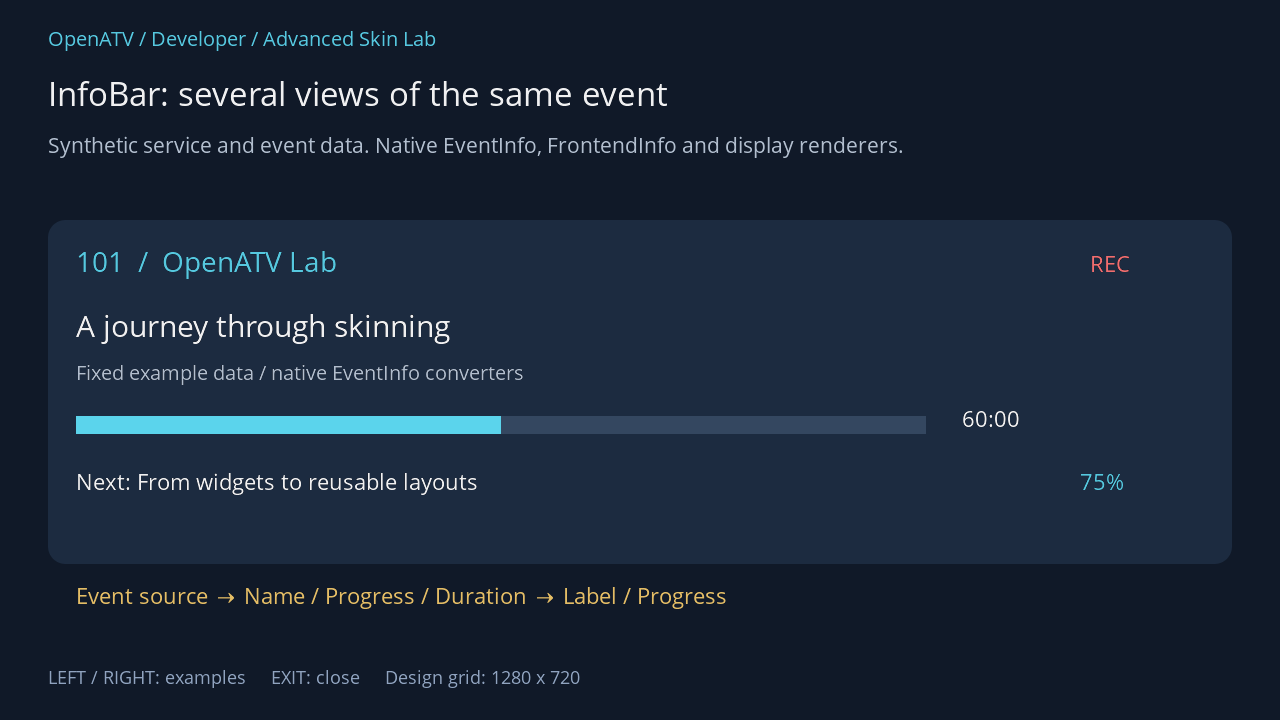
XML used for this result (inside the complete example screen):
<eRectangle position="48,220" size="1184,344" backgroundColor="#001C2B40" zPosition="0" cornerRadius="18"/> <widget source="demoService" render="Label" position="76,242" size="900,48" font="Regular;30" foregroundColor="#005BD4EC" transparent="1" zPosition="2" /> <widget source="demoRecording" render="FixedLabel" position="1090,248" size="110,44" font="Regular;24" text="REC" foregroundColor="#00FF7474" transparent="1" zPosition="2"> <convert type="ConditionalShowHide" /> </widget> <widget source="demoEvent" render="Label" position="76,304" size="1120,48" font="Regular;32" foregroundColor="#00FFFFFF" transparent="1" zPosition="2"> <convert type="EventInfo">Name</convert> </widget> <widget source="demoEvent" render="Label" position="76,358" size="1120,36" font="Regular;22" foregroundColor="#00BDCADA" transparent="1" zPosition="2"> <convert type="EventInfo">ShortDescription</convert> </widget> <widget source="demoEvent" render="Progress" position="76,416" size="850,18" foregroundColor="#005BD4EC" backgroundColor="#00344760" borderWidth="0" zPosition="2"> <convert type="EventInfo">Progress</convert> </widget> <widget source="demoEvent" render="Label" position="962,403" size="230,46" font="Regular;24" foregroundColor="#00FFFFFF" transparent="1" zPosition="2"> <convert type="EventInfo">Duration</convert> <convert type="ClockToText">AsLength</convert> </widget> <widget source="demoNext" render="Label" position="76,466" size="940,40" font="Regular;24" foregroundColor="#00FFFFFF" transparent="1" zPosition="2" /> <widget source="demoSignal" render="Label" position="1080,466" size="124,40" font="Regular;24" foregroundColor="#005BD4EC" transparent="1" zPosition="2"> <convert type="FrontendInfo">SNR</convert> </widget> <eLabel position="76,580" size="1120,45" font="Regular;24" text="Event source → Name / Progress / Duration → Label / Progress" foregroundColor="#00F3C86A" transparent="1" zPosition="2" />Download complete infobar.xml · Download all examples and the test plugin
The complete plugin download includes advanced.py, where the fixture contracts are visible. The displayed service name is deliberately a StaticText; this example does not pretend to exercise ServiceName against a tuned service. For a real InfoBar, use the production chain shown above and session.CurrentService → ServiceName for its service title.
Why a widget updates
Abschnitt betitelt „Why a widget updates“Sources announce changes to connected elements. Converters receive those changes, invalidate cached derived values as appropriate, and notify downstream renderers. Some converters also poll: event progress and remaining time need to advance between EPG updates. The @cached properties avoid repeatedly computing the same value within an update cycle; they are not permanent storage.
Do not add a fast polling timer to every label. Prefer the existing event notifications and a converter’s existing polling policy. If a custom source changes a value, call its change notification mechanism; changing an ordinary Python attribute alone does not tell the rendered UI to repaint.
Missing data is a normal state
Abschnitt betitelt „Missing data is a normal state“No EPG event means there is no meaningful event title, duration or progress. A progress bar showing zero is not evidence that a programme has just started. During zapping, playback changes and empty EPG periods, the UI must tolerate absent data. Test these states separately from a filled example screen.
For a next-event title, a straightforward chain is session.Event_Next → EventInfo(Name) → Label. Avoid adding a second “next-event lookup” converter to a source that already represents the next event unless that converter’s documented contract specifically requires it.
Source: EventInfo, ClockToText, Progress, Element and cached properties.