
NetworkOverview — two lists, fixed headers and state colours
NetworkOverview owns an upper adapterList, a savedLabel heading and a lower savedList. The upper list selects an adapter; the lower list shows that wireless adapter’s saved connections. Both lists must exist in the skin even when no Wi-Fi profiles are available.
Layout and focus
Abschnitt betitelt „Layout and focus“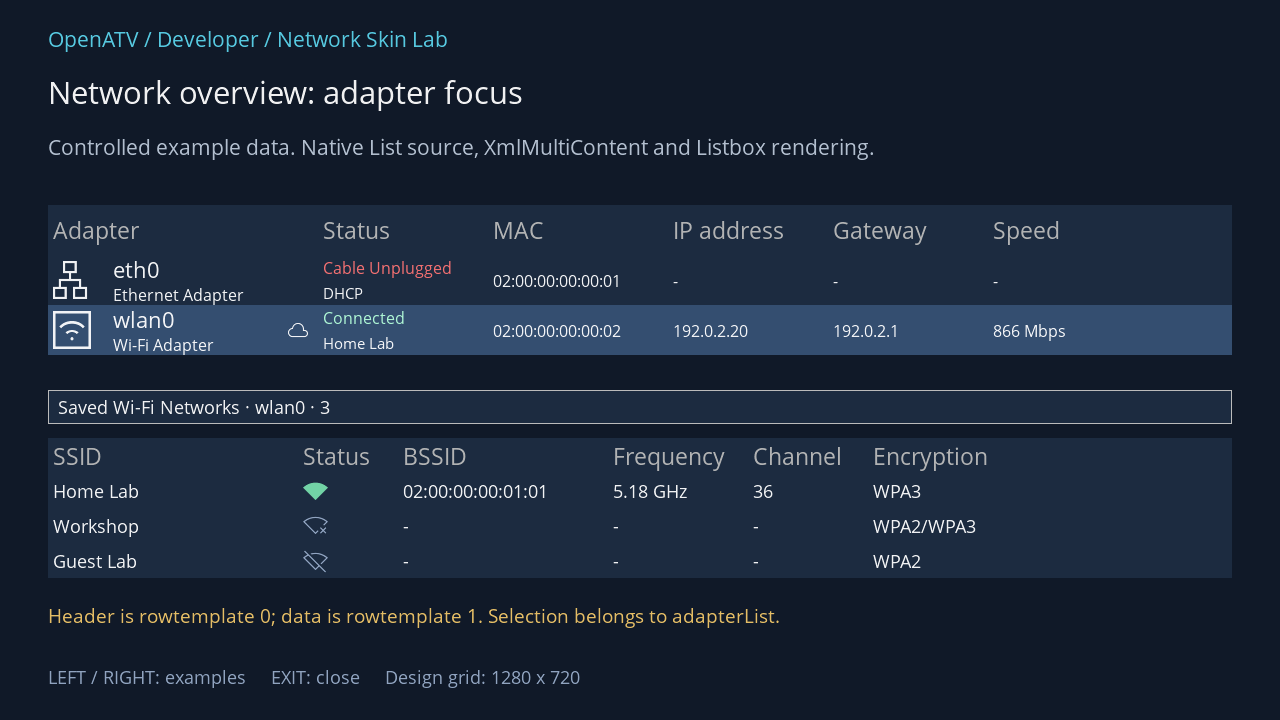
XML used for this result (inside the complete example screen):
<widget source="adapterList" render="Listbox" position="48,205" size="1184,150" foregroundColor="#00FFFFFF" backgroundColor="#001C2B40" foregroundColorSelected="#00FFFFFF" backgroundColorSelected="#00344E70"> <template name="Default" colors="#0078DFAD,#00FF7474,#0099ADCA,#00B5FFDA,#00FFC5C5,#00DAE4F2" fonts="Regular;25,enigma2icons;38,Regular;24,Regular;18,enigma2icons;20,Regular;16" itemHeight="50"> <rowtemplate> <text index="AdapterName" position="0,0" size="250,50" font="0" foregroundColor="gray" padding="5,0" verticalAlignment="center" /> <text index="StatusText" position="270,0" size="170,50" font="0" foregroundColor="gray" padding="5,0" verticalAlignment="center" /> <text index="MAC" position="440,0" size="180,50" font="0" foregroundColor="gray" padding="5,0" verticalAlignment="center" /> <text index="IPAddress" position="620,0" size="160,50" font="0" foregroundColor="gray" padding="5,0" verticalAlignment="center" /> <text index="Gateway" position="780,0" size="160,50" font="0" foregroundColor="gray" padding="5,0" verticalAlignment="center" /> <text index="Speed" position="940,0" size="140,50" font="0" foregroundColor="gray" padding="5,0" verticalAlignment="center" /> </rowtemplate> <rowtemplate> <text index="AdapterGlyph" position="0,6" size="48,38" font="1" horizontalAlignment="center" padding="5,0" verticalAlignment="center" /> <text index="AdapterName" position="60,0" size="170,28" font="2" padding="5,0" verticalAlignment="center" /> <text index="AdapterType" position="60,28" size="170,22" font="3" padding="5,0" verticalAlignment="center" /> <text index="InternetGlyph" position="230,0" size="40,50" font="4" horizontalAlignment="center" padding="5,0" verticalAlignment="center" /> <text index="StatusText" position="270,0" size="170,25" font="3" foregroundColor="+StatusColor" foregroundColorSelected="+StatusColorSelected" padding="5,0" verticalAlignment="center" /> <text index="ConnectionText" position="270,25" size="150,25" font="5" padding="5,0" verticalAlignment="center" /> <text index="MAC" position="440,0" size="180,50" font="3" padding="5,0" verticalAlignment="center" /> <text index="IPAddress" position="620,0" size="160,50" font="3" padding="5,0" verticalAlignment="center" /> <text index="Gateway" position="780,0" size="160,50" font="3" padding="5,0" verticalAlignment="center" /> <text index="Speed" position="940,0" size="140,50" font="3" padding="5,0" verticalAlignment="center" /> </rowtemplate> </template> </widget> <widget source="savedLabel" render="Label" position="48,390" size="1184,34" foregroundColor="#00FFFFFF" padding="10,0" verticalAlignment="center" widgetBorderColor="gray" widgetBorderWidth="1" font="Regular;20" backgroundColor="#001C2B40" foregroundColorSelected="#00FFFFFF" backgroundColorSelected="#00344E70"> <convert type="ConditionalShowHide" /> </widget> <widget source="savedList" render="Listbox" position="48,438" size="1184,140" foregroundColor="#00FFFFFF" backgroundColor="#001C2B40" foregroundColorSelected="#00FFFFFF" backgroundColorSelected="#00344E70"> <template name="Default" colors="#0078DFAD,#00FF7474,#0099ADCA,#00B5FFDA,#00FFC5C5,#00DAE4F2" fonts="Regular;25,Regular;20,enigma2icons;25" itemHeight="35"> <rowtemplate> <text index="SSID" position="0,0" size="250,35" font="0" foregroundColor="gray" padding="5,0" verticalAlignment="center" /> <text index="StatusText" position="250,0" size="100,35" font="0" foregroundColor="gray" padding="5,0" verticalAlignment="center" /> <text index="BSSID" position="350,0" size="210,35" font="0" foregroundColor="gray" padding="5,0" verticalAlignment="center" /> <text index="Frequency" position="560,0" size="140,35" font="0" foregroundColor="gray" padding="5,0" verticalAlignment="center" /> <text index="Channel" position="700,0" size="120,35" font="0" foregroundColor="gray" padding="5,0" verticalAlignment="center" /> <text index="Encryption" position="820,0" size="260,35" font="0" foregroundColor="gray" padding="5,0" verticalAlignment="center" /> </rowtemplate> <rowtemplate> <text index="SSID" position="0,0" size="250,35" font="1" padding="5,0" verticalAlignment="center" /> <text index="StatusGlyph" position="250,0" size="100,35" font="2" foregroundColor="+StatusColor" foregroundColorSelected="+StatusColorSelected" padding="5,0" verticalAlignment="center" /> <text index="BSSID" position="350,0" size="210,35" font="1" padding="5,0" verticalAlignment="center" /> <text index="Frequency" position="560,0" size="140,35" font="1" padding="5,0" verticalAlignment="center" /> <text index="Channel" position="700,0" size="120,35" font="1" padding="5,0" verticalAlignment="center" /> <text index="Encryption" position="820,0" size="260,35" font="1" padding="5,0" verticalAlignment="center" /> </rowtemplate> </template> </widget>Download complete network-overview.xml · Download all examples and the test plugin
The built-in 1280 × 720 layout uses a 1100 × 540 screen. Its upper rows are 50 pixels high; its lower rows are 35 pixels high. The lab places the same child templates in a larger teaching frame. If you change row heights, revise every column’s vertical position and size as well as the list’s total height. Setting only a larger font can clip the lower line of an adapter row.
adapterList and savedList each use two row templates:
| Row selector | Upper list | Lower list |
|---|---|---|
0 |
Adapter column headings | Saved-profile column headings |
1 |
Ethernet, Wi-Fi or VPN data | Saved Wi-Fi connection data |
The Python owner marks the header non-selectable and locks it as the first row. Keep the header template first. Reversing the two definitions makes heading text use the data layout and ordinary rows use the heading layout.
The owner sets selectionEnabled() independently for the two lists and routes navigation to the focused list. Right/last can enter the saved list when it has data; left/first returns to the adapter list. Do not make both lists look selected permanently. The Wi-Fi chapter shows the same layout with focus in the lower list.
Adapter fields and meaning
Abschnitt betitelt „Adapter fields and meaning“| Fields | What the skin receives |
|---|---|
AdapterGlyph, AdapterName, AdapterType |
Icon-font character, interface name and translated type text |
StatusText |
Deactivated, Connected, Not Connected, Cable Unplugged, or VPN-specific Up/Down |
StatusColor, StatusColorSelected |
Packed normal and selected colours chosen by the owner |
MAC, IPAddress, Gateway, Speed |
Already formatted text; unavailable values may be - |
InternetGlyph |
Cloud glyph when the adapter has the corresponding internet state; empty when absent. VPN uses its own locked-cloud condition |
ConnectionText |
Secondary line supplied by the network manager for this adapter |
Connected describes link/association. It must not be relabelled as “Internet available”: internet checking is separate and can finish later. Wi-Fi bitrate, Ethernet speed and a throughput test are also different quantities; display the supplied Speed text without inventing a transfer-rate guarantee.
The private adapter object follows the public fields at tuple position 13. It is used for actions, not for a text widget. VPN rows use the same drawing fields but do not behave as configurable physical adapters; the owner disables or changes actions accordingly.
Three or six palette entries
Abschnitt betitelt „Three or six palette entries“Both list templates can supply colors. This is a NetworkOverview-specific convention, read from each source’s additionalTemplateAttributes after the XML template is connected.
<template name="Default" colors="#0078DFAD,#00FF7474,#0099ADCA,#00B5FFDA,#00FFC5C5,#00DAE4F2" fonts="Regular;25,enigma2icons;38,Regular;24,Regular;18,enigma2icons;20,Regular;16" itemHeight="50"> <!-- header and data rowtemplate definitions --></template>| Position | Meaning |
|---|---|
| 0 | Connected, normal row |
| 1 | LAN with no link / applicable failure state, normal row |
| 2 | Idle, disabled, not associated or saved-only, normal row |
| 3 | Connected, selected row |
| 4 | No-link state, selected row |
| 5 | Idle state, selected row |
With three entries, the same three colours are reused for selected rows. With six, you can preserve contrast against a different selection background. Other counts fall back to the owner’s defaults and produce a diagnostic. Colours still need valid skin colour syntax.
The row template must consume both fields:
<text index="StatusText" position="270,0" size="170,25" font="3" foregroundColor="+StatusColor" foregroundColorSelected="+StatusColorSelected" padding="5,0" verticalAlignment="center" />Changing the colors attribute alone has no visible effect if the row hard-codes white and never reads those fields. Conversely, backgroundColorSelected on the list changes the selection background, not the status palette. Test text against both backgrounds.
Saved-list visibility and keys
Abschnitt betitelt „Saved-list visibility and keys“For a selected non-Wi-Fi adapter, the owner empties savedList and savedLabel. The list region does not automatically collapse and reflow the rest of the screen. Keep a deliberate empty-state layout. The heading’s ConditionalShowHide hides its renderer when its text is empty.
key_green, key_blue, key_yellow and key_info change with focus and available actions. Retain key_menu and help access too. A skin must display the source text rather than baking “Connect” into every blue button: adapter selection and saved-profile selection have different meanings.
Exact index maps and complete fallback
Abschnitt betitelt „Exact index maps and complete fallback“Source: NetworkOverview — exact field names from the pinned Python owner:
adapterList · List source
| XML index name | Tuple position |
|---|---|
Reserved_for_rowTemplate | 0 |
AdapterGlyph | 1 |
AdapterName | 2 |
AdapterType | 3 |
StatusText | 4 |
StatusColor | 5 |
StatusColorSelected | 6 |
MAC | 7 |
IPAddress | 8 |
Gateway | 9 |
Speed | 10 |
InternetGlyph | 11 |
ConnectionText | 12 |
savedList · List source
| XML index name | Tuple position |
|---|---|
Reserved_for_rowTemplate | 0 |
SSID | 1 |
BSSID | 2 |
Frequency | 3 |
Channel | 4 |
Encryption | 5 |
StatusText | 6 |
StatusGlyph | 7 |
StatusColor | 8 |
StatusColorSelected | 9 |
Complete built-in NetworkOverview fallback XML
This is the source definition, including production button sources. It is distinct from the lab frame used in the illustration.
<screen name="NetworkOverview" title="Network Overview" position="center,center" size="1100,540" resolution="1280,720"> <widget source="adapterList" render="Listbox" position="10,10" size="e-20,250"> <template name="Default" colors="#0000CC00,#00CC0000,#00CCCCCC,#00003300,#00330000,#00333333" fonts="Regular;25,enigma2icons;38,Regular;24,Regular;18,enigma2icons;20,Regular;16" itemHeight="50"> <rowtemplate> <text index="AdapterName" position="0,0" size="250,50" font="0" foregroundColor="gray" padding="5,0" verticalAlignment="center" /> <text index="StatusText" position="270,0" size="170,50" font="0" foregroundColor="gray" padding="5,0" verticalAlignment="center" /> <text index="MAC" position="440,0" size="180,50" font="0" foregroundColor="gray" padding="5,0" verticalAlignment="center" /> <text index="IPAddress" position="620,0" size="160,50" font="0" foregroundColor="gray" padding="5,0" verticalAlignment="center" /> <text index="Gateway" position="780,0" size="160,50" font="0" foregroundColor="gray" padding="5,0" verticalAlignment="center" /> <text index="Speed" position="940,0" size="140,50" font="0" foregroundColor="gray" padding="5,0" verticalAlignment="center" /> </rowtemplate> <rowtemplate> <text index="AdapterGlyph" position="0,6" size="48,38" font="1" horizontalAlignment="center" padding="5,0" verticalAlignment="center" /> <text index="AdapterName" position="60,0" size="170,28" font="2" padding="5,0" verticalAlignment="center" /> <text index="AdapterType" position="60,28" size="170,22" font="3" padding="5,0" verticalAlignment="center" /> <text index="InternetGlyph" position="230,0" size="40,50" font="4" horizontalAlignment="center" padding="5,0" verticalAlignment="center" /> <text index="StatusText" position="270,0" size="170,25" font="3" foregroundColor="+StatusColor" foregroundColorSelected="+StatusColorSelected" padding="5,0" verticalAlignment="center" /> <text index="ConnectionText" position="270,25" size="150,25" font="5" padding="5,0" verticalAlignment="center" /> <text index="MAC" position="440,0" size="180,50" font="3" padding="5,0" verticalAlignment="center" /> <text index="IPAddress" position="620,0" size="160,50" font="3" padding="5,0" verticalAlignment="center" /> <text index="Gateway" position="780,0" size="160,50" font="3" padding="5,0" verticalAlignment="center" /> <text index="Speed" position="940,0" size="140,50" font="3" padding="5,0" verticalAlignment="center" /> </rowtemplate> </template> </widget> <widget source="savedLabel" render="Label" position="10,270" size="e-20,25" foregroundColor="gray" padding="10,0" verticalAlignment="center" widgetBorderColor="gray" widgetBorderWidth="1"> <convert type="ConditionalShowHide" /> </widget> <widget source="savedList" render="Listbox" position="10,305" size="e-20,175"> <template name="Default" colors="#0000CC00,#00CC0000,#00CCCCCC,#00003300,#00330000,#00333333" fonts="Regular;25,Regular;20,enigma2icons;25" itemHeight="35"> <rowtemplate> <text index="SSID" position="0,0" size="250,35" font="0" foregroundColor="gray" padding="5,0" verticalAlignment="center" /> <text index="StatusText" position="250,0" size="100,35" font="0" foregroundColor="gray" padding="5,0" verticalAlignment="center" /> <text index="BSSID" position="350,0" size="210,35" font="0" foregroundColor="gray" padding="5,0" verticalAlignment="center" /> <text index="Frequency" position="560,0" size="140,35" font="0" foregroundColor="gray" padding="5,0" verticalAlignment="center" /> <text index="Channel" position="700,0" size="120,35" font="0" foregroundColor="gray" padding="5,0" verticalAlignment="center" /> <text index="Encryption" position="820,0" size="260,35" font="0" foregroundColor="gray" padding="5,0" verticalAlignment="center" /> </rowtemplate> <rowtemplate> <text index="SSID" position="0,0" size="250,35" font="1" padding="5,0" verticalAlignment="center" /> <text index="StatusGlyph" position="250,0" size="100,35" font="2" foregroundColor="+StatusColor" foregroundColorSelected="+StatusColorSelected" padding="5,0" verticalAlignment="center" /> <text index="BSSID" position="350,0" size="210,35" font="1" padding="5,0" verticalAlignment="center" /> <text index="Frequency" position="560,0" size="140,35" font="1" padding="5,0" verticalAlignment="center" /> <text index="Channel" position="700,0" size="120,35" font="1" padding="5,0" verticalAlignment="center" /> <text index="Encryption" position="820,0" size="260,35" font="1" padding="5,0" verticalAlignment="center" /> </rowtemplate> </template> </widget> <widget source="key_red" render="Label" position="10,e-50" size="180,40" backgroundColor="key_red" font="Regular;20" foregroundColor="key_text" horizontalAlignment="center" wrap="off" verticalAlignment="center"> <convert type="ConditionalShowHide" /> </widget> <widget source="key_green" render="Label" position="200,e-50" size="180,40" backgroundColor="key_green" font="Regular;20" foregroundColor="key_text" horizontalAlignment="center" wrap="off" verticalAlignment="center"> <convert type="ConditionalShowHide" /> </widget> <widget source="key_yellow" render="Label" position="390,e-50" size="180,40" backgroundColor="key_yellow" font="Regular;20" foregroundColor="key_text" horizontalAlignment="center" wrap="off" verticalAlignment="center"> <convert type="ConditionalShowHide" /> </widget> <widget source="key_blue" render="Label" position="580,e-50" size="180,40" backgroundColor="key_blue" font="Regular;20" foregroundColor="key_text" horizontalAlignment="center" wrap="off" verticalAlignment="center"> <convert type="ConditionalShowHide" /> </widget> <widget source="key_menu" render="Label" position="e-300,e-50" size="90,40" backgroundColor="key_back" font="Regular;20" foregroundColor="key_text" horizontalAlignment="center" wrap="off" verticalAlignment="center"> <convert type="ConditionalShowHide" /> </widget> <widget source="key_info" render="Label" position="e-200,e-50" size="90,40" backgroundColor="key_back" font="Regular;20" foregroundColor="key_text" horizontalAlignment="center" wrap="off" verticalAlignment="center"> <convert type="ConditionalShowHide" /> </widget> <widget source="key_help" render="Label" position="e-100,e-50" size="90,40" backgroundColor="key_back" font="Regular;20" foregroundColor="key_text" horizontalAlignment="center" wrap="off" verticalAlignment="center"> <convert type="ConditionalShowHide" /> </widget> </screen>