
Icon fonts instead of suitable pixmap assets
An icon font stores symbols as glyphs. An Enigma2 label draws a chosen Unicode character using a font alias, size and foreground colour. This works well for simple status, navigation and action symbols that should match the skin’s colour palette.
The built-in enigma2icons font
Abschnitt betitelt „The built-in enigma2icons font“The source’s skin initialisation registers enigma2icons.ttf as enigma2icons when the font file is installed. The following code points are verified against the font in the pinned source revision and the corresponding core usage:
| Code point | Glyph in this font |
|---|---|
U+E914 |
check_circle |
U+E918 |
cancel |
U+E9FE |
wifi_device |
U+EA5A |
lan |
U+EA68 |
cloud |
U+EA77 |
signal_wifi_4_bar |
U+EA78 |
signal_wifi_bad |
U+EA79 |
signal_wifi_off |
These are Private Use Area code points. Their meaning comes from this font, not from a universal Unicode icon standard. The same number in another font can produce an unrelated glyph or nothing at all.
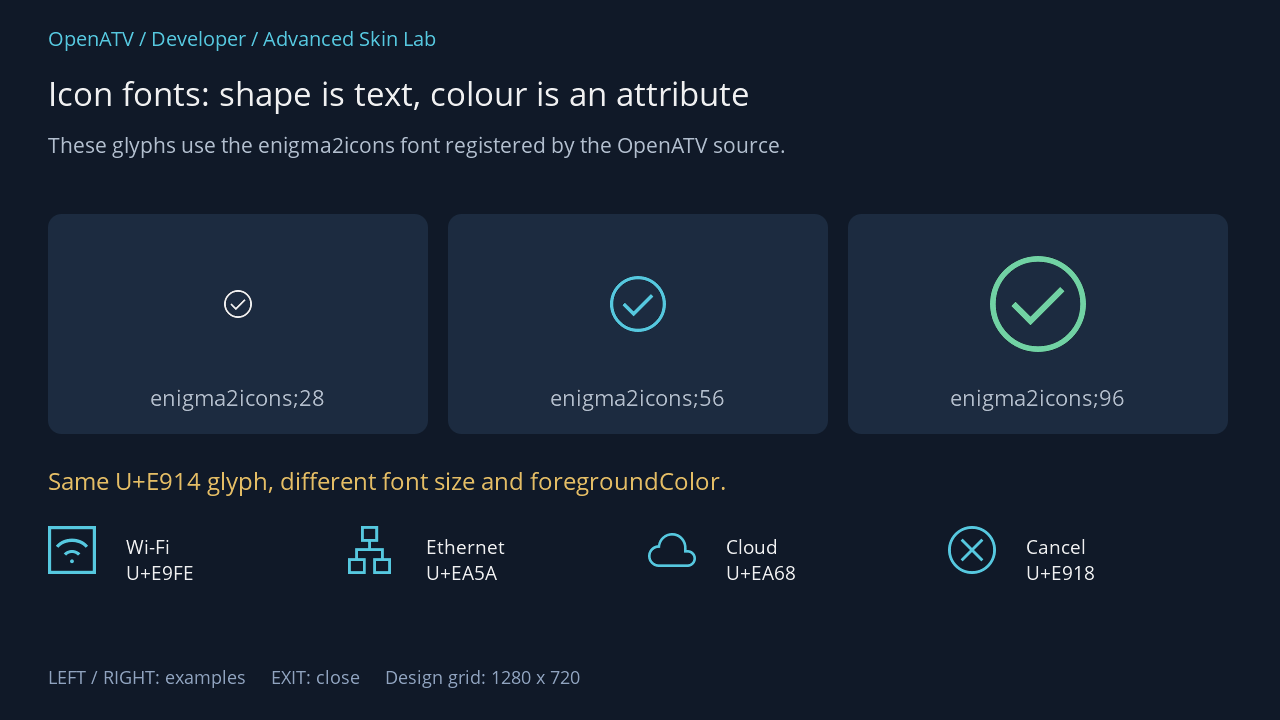
XML used for this result (inside the complete example screen):
<eRectangle position="48,214" size="380,220" backgroundColor="#001C2B40" zPosition="0" cornerRadius="14"/><eLabel position="74,240" size="328,128" font="enigma2icons;28" text="" foregroundColor="#00FFFFFF" horizontalAlignment="center" verticalAlignment="center" transparent="1" zPosition="2" /><eLabel position="68,382" size="340,42" font="Regular;24" text="enigma2icons;28" foregroundColor="#00BDCADA" transparent="1" zPosition="2" horizontalAlignment="center"/><eRectangle position="448,214" size="380,220" backgroundColor="#001C2B40" zPosition="0" cornerRadius="14"/><eLabel position="474,240" size="328,128" font="enigma2icons;56" text="" foregroundColor="#005BD4EC" horizontalAlignment="center" verticalAlignment="center" transparent="1" zPosition="2" /><eLabel position="468,382" size="340,42" font="Regular;24" text="enigma2icons;56" foregroundColor="#00BDCADA" transparent="1" zPosition="2" horizontalAlignment="center"/><eRectangle position="848,214" size="380,220" backgroundColor="#001C2B40" zPosition="0" cornerRadius="14"/><eLabel position="874,240" size="328,128" font="enigma2icons;96" text="" foregroundColor="#0078DFAD" horizontalAlignment="center" verticalAlignment="center" transparent="1" zPosition="2" /><eLabel position="868,382" size="340,42" font="Regular;24" text="enigma2icons;96" foregroundColor="#00BDCADA" transparent="1" zPosition="2" horizontalAlignment="center"/><eLabel position="48,464" size="1184,40" font="Regular;26" text="Same U+E914 glyph, different font size and foregroundColor." foregroundColor="#00F3C86A" transparent="1" zPosition="2" /><eLabel position="48,526" size="64,64" font="enigma2icons;48" text="" foregroundColor="#005BD4EC" transparent="1" zPosition="2" /><eLabel position="126,533" size="206,74" font="Regular;21" text="Wi-Fi U+E9FE" foregroundColor="#00FFFFFF" transparent="1" zPosition="2" /><eLabel position="348,526" size="64,64" font="enigma2icons;48" text="" foregroundColor="#005BD4EC" transparent="1" zPosition="2" /><eLabel position="426,533" size="206,74" font="Regular;21" text="Ethernet U+EA5A" foregroundColor="#00FFFFFF" transparent="1" zPosition="2" /><eLabel position="648,526" size="64,64" font="enigma2icons;48" text="" foregroundColor="#005BD4EC" transparent="1" zPosition="2" /><eLabel position="726,533" size="206,74" font="Regular;21" text="Cloud U+EA68" foregroundColor="#00FFFFFF" transparent="1" zPosition="2" /><eLabel position="948,526" size="64,64" font="enigma2icons;48" text="" foregroundColor="#005BD4EC" transparent="1" zPosition="2" /><eLabel position="1026,533" size="206,74" font="Regular;21" text="Cancel U+E918" foregroundColor="#00FFFFFF" transparent="1" zPosition="2" />Download complete icon-fonts.xml · Download all examples and the test plugin
XML and Python notation
Abschnitt betitelt „XML and Python notation“<eLabel position="20,20" size="80,80" font="enigma2icons;56" text="" foregroundColor="#0078DFAD" transparent="1" horizontalAlignment="center" verticalAlignment="center" /> is an XML numeric character reference. In Python the equivalent is "\uE914" or chr(0xE914). Writing the six visible characters \uE914 into an XML text attribute does not use Python’s string escape rules. A code point also needs the matching font alias; Regular is not a substitute for enigma2icons.
For a source-driven icon, use a source that supplies the glyph as text with render="Label". For a fixed glyph controlled only by a boolean visibility chain, use render="FixedLabel" plus ConditionalShowHide, as in the InfoBar status chapter.
Registering a skin’s own font
Abschnitt betitelt „Registering a skin’s own font“<fonts> <font filename="MySkin/fonts/MyIcons.ttf" name="MySkinIcons" scale="100" /></fonts>This is a registration example: ship the actual font at the resolved location and use an appropriate licence. The alias MySkinIcons is then used in font="MySkinIcons;40". Keep aliases unique and do not replace the normal text font or mark an icon font as a general replacement font. A replacement icon font can interfere with text fallback.
A font’s em size, ascender, descender and side bearings affect visual placement. font="...;48" does not guarantee a 48 × 48 ink rectangle. Allow adequate label height, centre within a clear box and inspect at HD/FHD/WQHD design scales. Small symbols may need a different optical size from neighbouring text even when both use the same nominal point size.
When to keep a pixmap
Abschnitt betitelt „When to keep a pixmap“| Icon font fits | Pixmap or artwork fits |
|---|---|
| Single-colour status and action symbols | Multicolour station logos/picons |
Recolouring through foregroundColor |
Posters, cover images and photos |
| A consistent family at several sizes | Detailed artwork with per-pixel colour/transparency |
| Many small monochrome symbols | A small number of assets whose appearance must match an exact raster design |
Font glyphs are still rasterised when drawn. They can reduce the number of image files and make colour variants easier to maintain, but “font” does not automatically mean lower memory use or faster rendering. Test actual sizes, visual quality and screen behaviour. This path does not imply browser-like emoji or colour-font support.
Core components such as choice lists, file lists, movie lists and the virtual keyboard also have specialised icon-font hooks. Their contracts differ from an ordinary label. The next chapter covers the particularly useful MultiPixmap state-icon option.
Source: font registration, source font, network glyph usage.