
Pixmaps, scaling and image transparency
Static and dynamic images
Section titled “Static and dynamic images”Use <ePixmap> for static artwork in XML. A Python Pixmap component uses <widget name="…">. A dynamic source-based image uses an appropriate renderer, such as Pixmap, provided the source exposes the data that renderer expects.
pixmap is a file path, size is the widget rectangle and scale controls how the loaded image fits inside it. These are three different decisions.
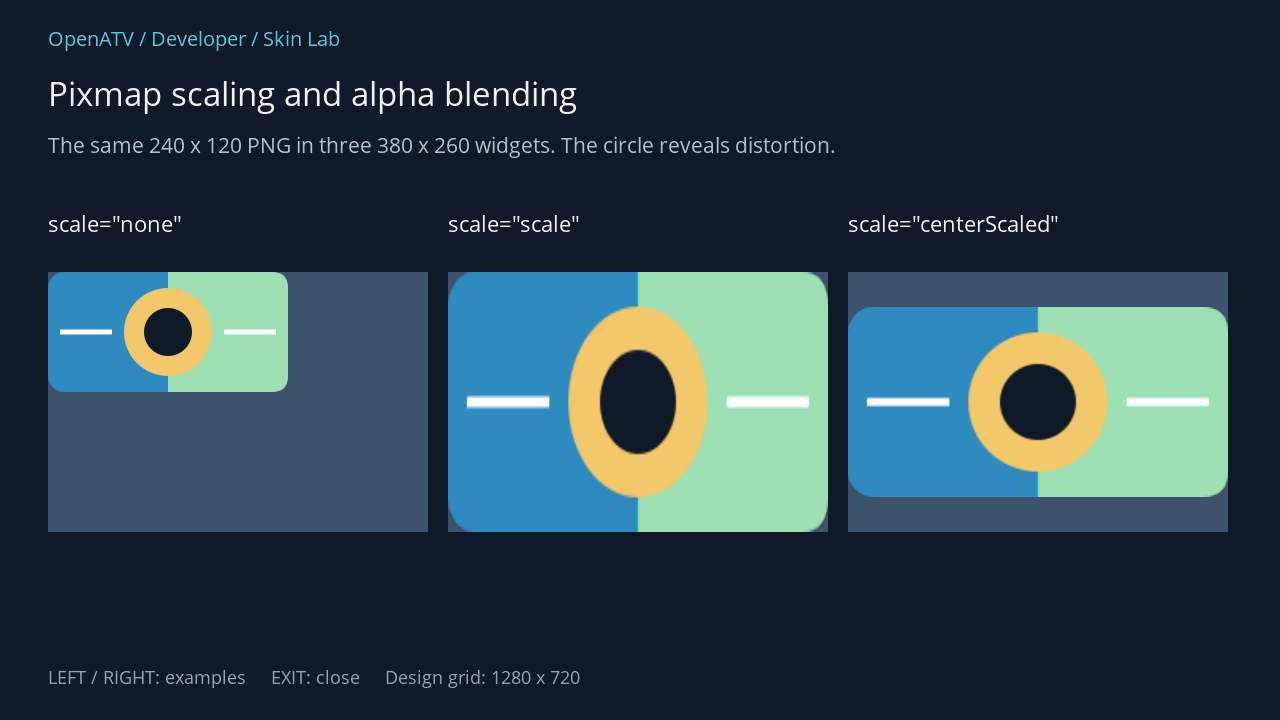
XML used for this result (inside the complete example screen):
<eLabel position="48,208" size="380,42" font="Regular;24" text='scale="none"' foregroundColor="#00FFFFFF" transparent="1" /> <eRectangle position="48,272" size="380,260" backgroundColor="#003D526D" zPosition="0" /> <ePixmap position="48,272" size="380,260" pixmap="~/assets/pattern.png" scale="none" alphaTest="blend" zPosition="1" /> <eLabel position="448,208" size="380,42" font="Regular;24" text='scale="scale"' foregroundColor="#00FFFFFF" transparent="1" /> <eRectangle position="448,272" size="380,260" backgroundColor="#003D526D" zPosition="0" /> <ePixmap position="448,272" size="380,260" pixmap="~/assets/pattern.png" scale="scale" alphaTest="blend" zPosition="1" /> <eLabel position="848,208" size="380,42" font="Regular;24" text='scale="centerScaled"' foregroundColor="#00FFFFFF" transparent="1" /> <eRectangle position="848,272" size="380,260" backgroundColor="#003D526D" zPosition="0" /> <ePixmap position="848,272" size="380,260" pixmap="~/assets/pattern.png" scale="centerScaled" alphaTest="blend" zPosition="1" />Download complete pixmaps.xml · Download all examples and the test plugin
Common scaling values
Section titled “Common scaling values”scale value |
Behaviour |
|---|---|
none |
Keep original pixel size |
scale |
Stretch to the widget rectangle, potentially changing aspect ratio |
keepAspect |
Scale while preserving aspect ratio |
centerScaled |
Fit with aspect ratio preserved and centre horizontally/vertically |
leftTop, rightBottom, etc. |
Fit with preserved aspect ratio and the stated alignment |
The engine accepts more flags and legacy spellings. Use parseScale to inspect the exact mapping. scale here does not select HD/FHD/WQHD.
Alpha handling
Section titled “Alpha handling”alphaTest="off" disables the pixmap alpha mode. on uses alpha testing; blend uses smooth alpha blending and is the usual choice for antialiased PNG edges and partial transparency. The lowercase alphatest spelling is a compatibility alias.
A PNG’s alpha channel follows the image format’s convention. Do not invert PNG alpha because Enigma2’s XML colour strings use 00 for opaque; the image loader handles the conversion.
Paths and file failures
Section titled “Paths and file failures”The sample plugin supplies self.skin_path and uses ~/assets/pattern.png. If an image is missing, check the resolved path, filename case and file readability. Linux filenames are case-sensitive.
The original test artwork is also supplied as SVG source, with a PNG used in the example. That makes the demonstration reproducible without a dependency on a particular skin’s artwork. Larger source images use more receiver memory; choose an appropriate size and preserve crisp edges at the intended display resolution.