
Sources, converters and renderers
The data contract
Section titled “The data contract”Python screen registers a Source ↓ source="name"optional Converter(s), in XML order ↓ exposed properties, such as text / boolean / valueRenderer ↓ native GUI widgetOSD pixels| Role | Example | Responsibility |
|---|---|---|
| Source | Components.Sources.StaticText |
Owns data and emits change notifications |
| Converter | Components.Converter.ClockToText |
Reads a compatible input property and exposes formatted text |
| Renderer | Components.Renderer.Label |
Reads .text and updates a native eLabel |
A source is not a filename typed into XML. source="message" looks up an object already registered by the screen as self["message"]. Related-screen references such as session.… require that the named related screen and source actually exist.
One source can have several views
Section titled “One source can have several views”The example screen creates:
from Components.Sources.StaticText import StaticTextfrom Components.Sources.Source import Source
class ExampleDuration(Source):    time = 3661  # Fixed demonstration input, in seconds.
# Inside the Screen constructor, after Screen.__init__:self["message"] = StaticText("One source, two renderers")self["duration"] = ExampleDuration()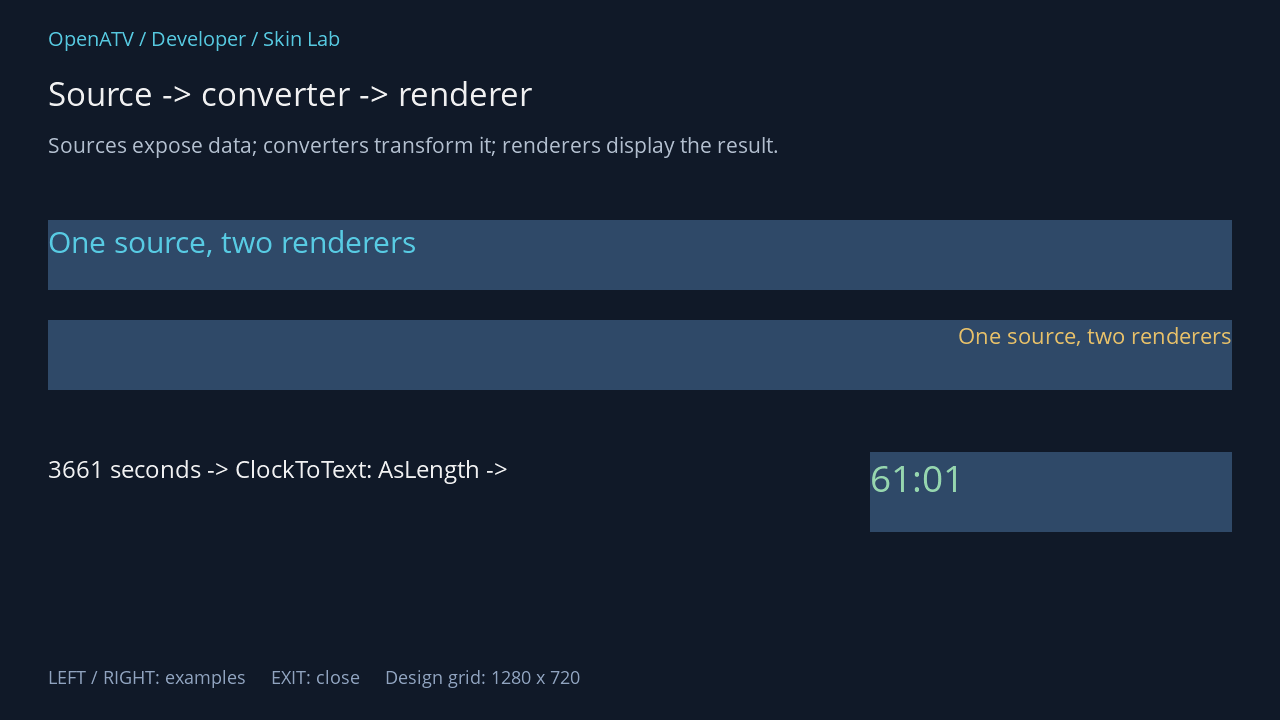
XML used for this result (inside the complete example screen):
<widget source="message" render="Label" position="48,220" size="1184,70" font="Regular;32" foregroundColor="#005BD4EC" backgroundColor="#002F4968" /> <widget source="message" render="Label" position="48,320" size="1184,70" font="Regular;24" horizontalAlignment="right" foregroundColor="#00F3C86A" backgroundColor="#002F4968" /> <eLabel position="48,452" size="780,80" font="Regular;26" text="3661 seconds -> ClockToText: AsLength ->" foregroundColor="#00FFFFFF" transparent="1" /> <widget source="duration" render="Label" position="870,452" size="362,80" font="Regular;40" foregroundColor="#009DE0B4" backgroundColor="#002F4968"> <convert type="ClockToText">AsLength</convert> </widget>Download complete data.xml · Download all examples and the test plugin
The AsLength result is minutes:seconds, so 3661 seconds becomes 61:01. It is deliberately independent of the receiver’s clock, time zone and active service.
What the engine constructs
Section titled “What the engine constructs”For each source widget, readSkin() resolves the source, imports each converter named by <convert type="…">, passes the element’s trimmed text as converter arguments, then connects a renderer named by render="…". Compatible converter instances may be reused for the same upstream source and arguments.
<convert type="ClockToText">AsLength</convert> selects Components.Converter.ClockToText.ClockToText. render="Label" selects Components.Renderer.Label.Label. File, class, source name and argument spelling are case-sensitive.
The converter must understand the upstream source’s properties, and the renderer must understand the converter’s output. A converter that expects a service object cannot be attached to arbitrary static text simply because the XML parses successfully.
Common starting points
Section titled “Common starting points”| Need | Typical source / conversion / renderer |
|---|---|
| Text supplied by a plugin | StaticText → Label |
| Receiver time | Clock → ClockToText → Label |
| A state controlling visibility | A boolean-producing source/converter → ConditionalShowHide in the appropriate chain |
| Service information | An actual service source → the specific service converter → a compatible renderer |
| A list of structured rows | List → a suitable list-content converter → Listbox; covered in a later unit |
The module catalogue lists the checked-in Sources, Converter and Renderer classes and links to their source. It does not claim that every class is installed on every image or that every screen exposes all of them.
Updating and cleaning up
Section titled “Updating and cleaning up”Use StaticText.text = "new text" for a text source. Custom sources/converters should notify downstream elements through the normal changed(...) mechanism and release timers/subscriptions in their lifecycle hooks. A skin converter should avoid blocking network or filesystem work in its paint/update path; a stalled source update can freeze the GUI.