
Wi-Fi skinning — profiles, scan fields and activation
Saved profiles and scan results answer different questions. A saved connection is a configuration the receiver can try; a scan result is an access point observed during a scan. A skinner must not merge their fields or assume their row formats are the same.
The saved-profile list
Section titled “The saved-profile list”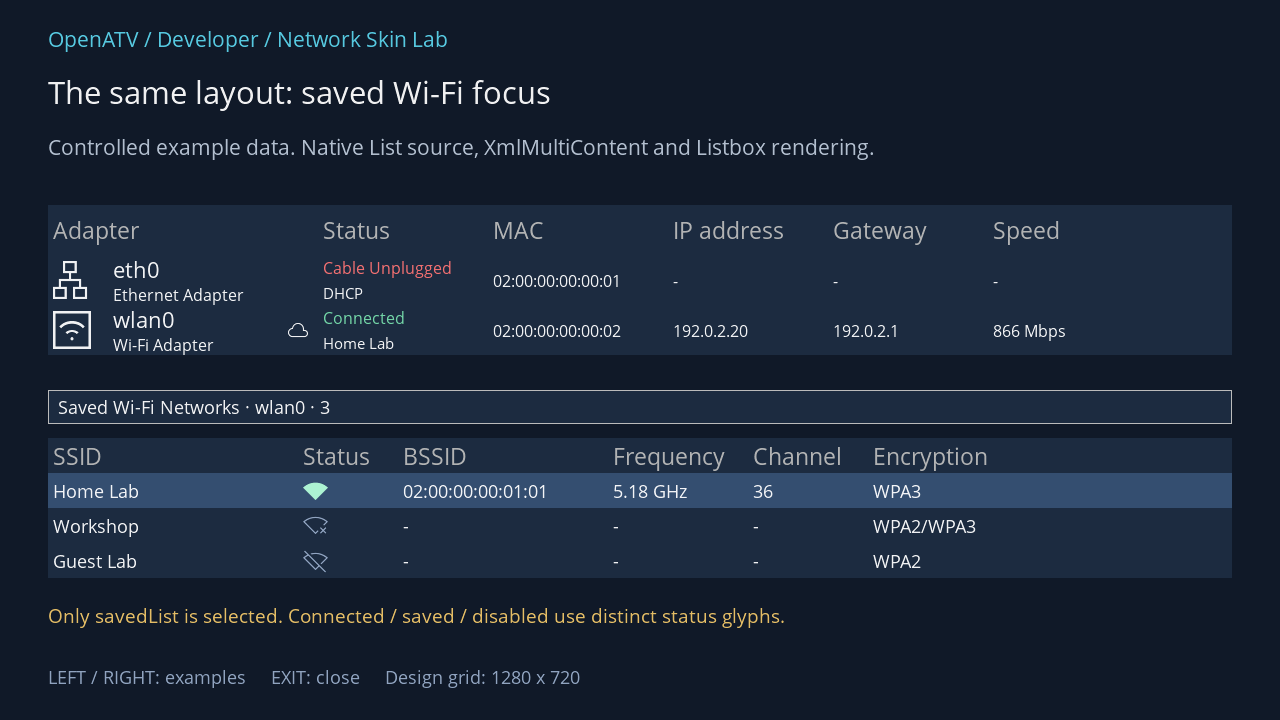
XML used for this result (inside the complete example screen):
<widget source="adapterList" render="Listbox" position="48,205" size="1184,150" foregroundColor="#00FFFFFF" backgroundColor="#001C2B40" foregroundColorSelected="#00FFFFFF" backgroundColorSelected="#00344E70"> <template name="Default" colors="#0078DFAD,#00FF7474,#0099ADCA,#00B5FFDA,#00FFC5C5,#00DAE4F2" fonts="Regular;25,enigma2icons;38,Regular;24,Regular;18,enigma2icons;20,Regular;16" itemHeight="50"> <rowtemplate> <text index="AdapterName" position="0,0" size="250,50" font="0" foregroundColor="gray" padding="5,0" verticalAlignment="center" /> <text index="StatusText" position="270,0" size="170,50" font="0" foregroundColor="gray" padding="5,0" verticalAlignment="center" /> <text index="MAC" position="440,0" size="180,50" font="0" foregroundColor="gray" padding="5,0" verticalAlignment="center" /> <text index="IPAddress" position="620,0" size="160,50" font="0" foregroundColor="gray" padding="5,0" verticalAlignment="center" /> <text index="Gateway" position="780,0" size="160,50" font="0" foregroundColor="gray" padding="5,0" verticalAlignment="center" /> <text index="Speed" position="940,0" size="140,50" font="0" foregroundColor="gray" padding="5,0" verticalAlignment="center" /> </rowtemplate> <rowtemplate> <text index="AdapterGlyph" position="0,6" size="48,38" font="1" horizontalAlignment="center" padding="5,0" verticalAlignment="center" /> <text index="AdapterName" position="60,0" size="170,28" font="2" padding="5,0" verticalAlignment="center" /> <text index="AdapterType" position="60,28" size="170,22" font="3" padding="5,0" verticalAlignment="center" /> <text index="InternetGlyph" position="230,0" size="40,50" font="4" horizontalAlignment="center" padding="5,0" verticalAlignment="center" /> <text index="StatusText" position="270,0" size="170,25" font="3" foregroundColor="+StatusColor" foregroundColorSelected="+StatusColorSelected" padding="5,0" verticalAlignment="center" /> <text index="ConnectionText" position="270,25" size="150,25" font="5" padding="5,0" verticalAlignment="center" /> <text index="MAC" position="440,0" size="180,50" font="3" padding="5,0" verticalAlignment="center" /> <text index="IPAddress" position="620,0" size="160,50" font="3" padding="5,0" verticalAlignment="center" /> <text index="Gateway" position="780,0" size="160,50" font="3" padding="5,0" verticalAlignment="center" /> <text index="Speed" position="940,0" size="140,50" font="3" padding="5,0" verticalAlignment="center" /> </rowtemplate> </template> </widget> <widget source="savedLabel" render="Label" position="48,390" size="1184,34" foregroundColor="#00FFFFFF" padding="10,0" verticalAlignment="center" widgetBorderColor="gray" widgetBorderWidth="1" font="Regular;20" backgroundColor="#001C2B40" foregroundColorSelected="#00FFFFFF" backgroundColorSelected="#00344E70"> <convert type="ConditionalShowHide" /> </widget> <widget source="savedList" render="Listbox" position="48,438" size="1184,140" foregroundColor="#00FFFFFF" backgroundColor="#001C2B40" foregroundColorSelected="#00FFFFFF" backgroundColorSelected="#00344E70"> <template name="Default" colors="#0078DFAD,#00FF7474,#0099ADCA,#00B5FFDA,#00FFC5C5,#00DAE4F2" fonts="Regular;25,Regular;20,enigma2icons;25" itemHeight="35"> <rowtemplate> <text index="SSID" position="0,0" size="250,35" font="0" foregroundColor="gray" padding="5,0" verticalAlignment="center" /> <text index="StatusText" position="250,0" size="100,35" font="0" foregroundColor="gray" padding="5,0" verticalAlignment="center" /> <text index="BSSID" position="350,0" size="210,35" font="0" foregroundColor="gray" padding="5,0" verticalAlignment="center" /> <text index="Frequency" position="560,0" size="140,35" font="0" foregroundColor="gray" padding="5,0" verticalAlignment="center" /> <text index="Channel" position="700,0" size="120,35" font="0" foregroundColor="gray" padding="5,0" verticalAlignment="center" /> <text index="Encryption" position="820,0" size="260,35" font="0" foregroundColor="gray" padding="5,0" verticalAlignment="center" /> </rowtemplate> <rowtemplate> <text index="SSID" position="0,0" size="250,35" font="1" padding="5,0" verticalAlignment="center" /> <text index="StatusGlyph" position="250,0" size="100,35" font="2" foregroundColor="+StatusColor" foregroundColorSelected="+StatusColorSelected" padding="5,0" verticalAlignment="center" /> <text index="BSSID" position="350,0" size="210,35" font="1" padding="5,0" verticalAlignment="center" /> <text index="Frequency" position="560,0" size="140,35" font="1" padding="5,0" verticalAlignment="center" /> <text index="Channel" position="700,0" size="120,35" font="1" padding="5,0" verticalAlignment="center" /> <text index="Encryption" position="820,0" size="260,35" font="1" padding="5,0" verticalAlignment="center" /> </rowtemplate> </template> </widget>Download complete network-profiles.xml · Download all examples and the test plugin
The fields in NetworkOverview.savedList are:
| Field | Presentation contract |
|---|---|
SSID |
Display name for the saved connection |
StatusText |
Connected, Not Connected or Disabled; also supplies the header’s Status caption |
StatusGlyph |
Connected EA77, enabled but not live EA78, disabled EA79 in enigma2icons |
StatusColor, StatusColorSelected |
State colours from this list’s overview palette |
BSSID, Frequency, Channel |
Live connection information only; otherwise - |
Encryption |
The configured encryption label, including WPA3/Enterprise variants when applicable |
The source determines the live row from the adapter’s link and matching SSID. Do not infer that all saved profiles are reachable just because they appear here. The trailing connection object at position 10 is private action data.
The built-in data row displays StatusGlyph instead of StatusText. You can allocate a wider status column and add text for accessibility, but preserve the three meanings. Keep inactive status visible when the lower list loses focus; losing selection is not the same as disabling a profile.
Scan results use a single mode
Section titled “Scan results use a single mode”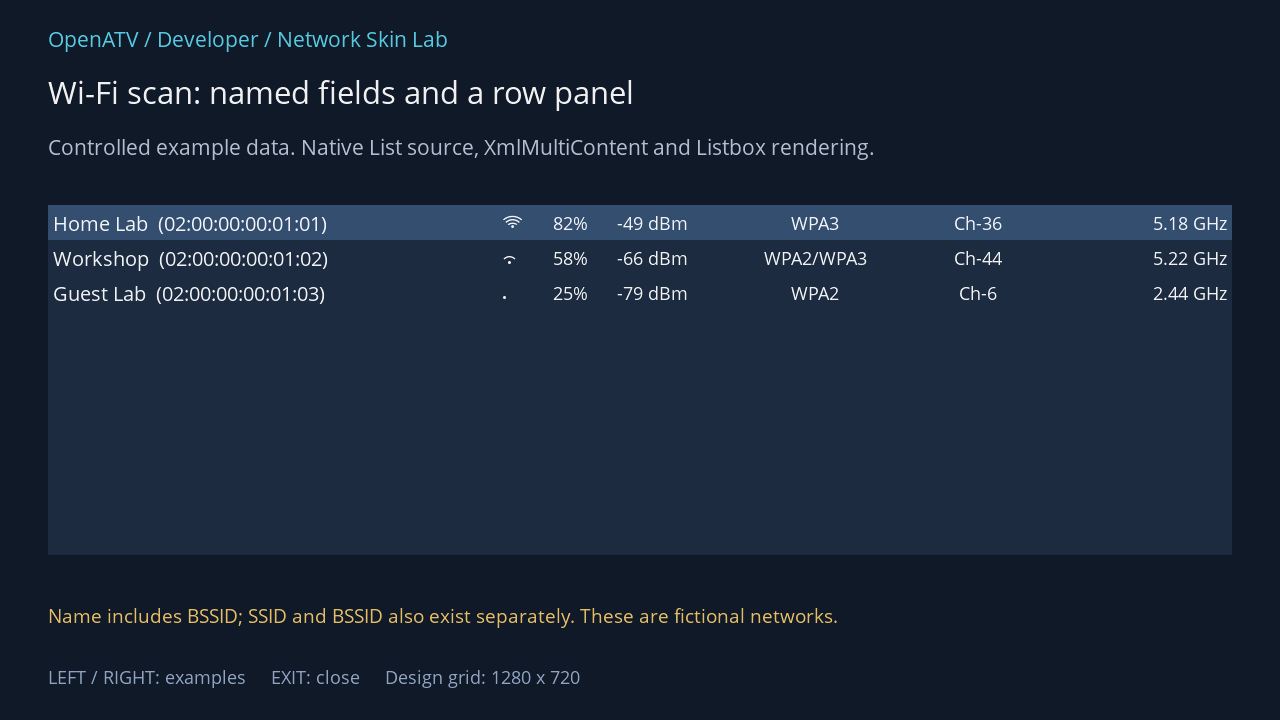
XML used for this result (inside the complete example screen):
<widget source="list" render="Listbox" position="48,205" size="1184,350" foregroundColor="#00FFFFFF" backgroundColor="#001C2B40" foregroundColorSelected="#00FFFFFF" backgroundColorSelected="#00344E70"> <template name="Default" fonts="Regular;22,Regular;20,enigma2icons;20" itemHeight="35"> <mode name="default"> <panel position="0,0" size="e,e" layout="horizontal"> <text index="Name" position="left" size="450,35" flags="scroll" font="0" padding="5,0" verticalAlignment="center" /> <text index="Glyph" position="left" size="30,35" font="2" horizontalAlignment="center" padding="5,0" verticalAlignment="center" /> <text index="Percentage" position="left" size="65,35" font="1" horizontalAlignment="right" padding="5,0" verticalAlignment="center" /> <text index="dBm" position="left" size="100,35" font="1" horizontalAlignment="right" padding="5,0" verticalAlignment="center" /> <text index="Encryption" position="left" size="245,35" font="1" horizontalAlignment="center" padding="5,0" verticalAlignment="center" /> <text index="Channel" position="left" size="80,35" font="1" horizontalAlignment="center" padding="5,0" verticalAlignment="center" /> <text index="Frequency" position="right" size="130,35" font="1" horizontalAlignment="right" padding="5,0" verticalAlignment="center" /> </panel> </mode> </template> </widget>Download complete network-wifi.xml · Download all examples and the test plugin
NetworkWiFiScan owns list as a List source and description as a named Label. It uses one default mode, not a header-selector row template. Tuple position zero is Name, so treating it as a row selector would break this screen.
| Field | Meaning / use |
|---|---|
Name |
Combined display SSID and BSSID, useful for distinguishing access points |
SSID, BSSID |
Separate values when your layout places them on different lines |
Glyph |
Icon-font signal representation supplied by ScanResult |
Strength |
Combined formatted signal text |
Percentage, dBm |
Separate formatted signal strings |
Encryption |
Security label supplied by the scan parser |
ChannelFrequency |
Combined channel/frequency text |
Channel, Frequency |
Separate formatted values |
All these signal fields are prepared for text rendering. Percentage contains a percent sign; it is not a numeric input for a progress element. Adding a native bar would require a suitable numeric field from a Python owner, not simply pointing progress at that string.
The built-in panel consumes columns from the left and frequency from the right. If you enlarge the SSID column without accounting for the others, the combined widths can overlap. At HD, a two-line layout with SSID and BSSID separated may be easier to read. Increase the row height and update the row’s child geometry together.
Long SSIDs, hidden/unknown names, long security labels, weak signal and an empty list all need deliberate space. Reserve the description area for scanning, count, empty and error feedback. Colour buttons and the source-provided count/status must remain legible while a scan is in progress.
Source: NetworkWiFiScan — exact field names from the pinned Python owner:
list · List source
| XML index name | Tuple position |
|---|---|
Name | 0 |
SSID | 1 |
BSSID | 2 |
Glyph | 3 |
Strength | 4 |
Percentage | 5 |
dBm | 6 |
Encryption | 7 |
ChannelFrequency | 8 |
Channel | 9 |
Frequency | 10 |
Complete built-in NetworkWiFiScan fallback XML
This is the source definition, including production button sources. It is distinct from the lab frame used in the illustration.
<screen name="NetworkWiFiScan" title="Wi-Fi Scan" position="center,center" size="1120,455" resolution="1280,720"> <widget source="list" render="Listbox" position="10,10" size="e-20,e-105"> <template name="Default" fonts="Regular;22,Regular;20,enigma2icons;20" itemHeight="35"> <mode name="default"> <panel position="0,0" size="e,e" layout="horizontal"> <text index="Name" position="left" size="450,35" flags="scroll" font="0" padding="5,0" verticalAlignment="center" /> <text index="Glyph" position="left" size="30,35" font="2" horizontalAlignment="center" padding="5,0" verticalAlignment="center" /> <text index="Percentage" position="left" size="65,35" font="1" horizontalAlignment="right" padding="5,0" verticalAlignment="center" /> <text index="dBm" position="left" size="100,35" font="1" horizontalAlignment="right" padding="5,0" verticalAlignment="center" /> <text index="Encryption" position="left" size="245,35" font="1" horizontalAlignment="center" padding="5,0" verticalAlignment="center" /> <text index="Channel" position="left" size="80,35" font="1" horizontalAlignment="center" padding="5,0" verticalAlignment="center" /> <text index="Frequency" position="right" size="130,35" font="1" horizontalAlignment="right" padding="5,0" verticalAlignment="center" /> </panel> </mode> </template> </widget> <widget name="description" position="10,e-85" size="e-20,25" padding="5,0" verticalAlignment="center" widgetBorderColor="gray" widgetBorderWidth="1" /> <widget source="key_red" render="Label" position="10,e-50" size="180,40" backgroundColor="key_red" font="Regular;20" foregroundColor="key_text" horizontalAlignment="center" wrap="off" verticalAlignment="center"> <convert type="ConditionalShowHide" /> </widget> <widget source="key_green" render="Label" position="200,e-50" size="180,40" backgroundColor="key_green" font="Regular;20" foregroundColor="key_text" horizontalAlignment="center" wrap="off" verticalAlignment="center"> <convert type="ConditionalShowHide" /> </widget> <widget source="key_yellow" render="Label" position="390,e-50" size="180,40" backgroundColor="key_yellow" font="Regular;20" foregroundColor="key_text" horizontalAlignment="center" wrap="off" verticalAlignment="center"> <convert type="ConditionalShowHide" /> </widget> <widget source="key_help" render="Label" position="e-100,e-50" size="90,40" backgroundColor="key_back" font="Regular;20" foregroundColor="key_text" horizontalAlignment="center" verticalAlignment="center"> <convert type="ConditionalShowHide" /> </widget> </screen>Configuration and activation
Section titled “Configuration and activation”NetworkWiFiSetup is a Setup form; it is not another scan list. Use its config, inherited help/description fields and dynamic key sources. Security choices can change the available form entries. Enterprise certificate/key provisioning is an administrative task outside this GUI; a skin cannot create unsupported editor fields by adding XML labels.
NetworkWiFiActivator is a small separate screen with a named status Label and key_red source. Its status combines SSID, adapter and changing progress/result text with line breaks. Give the label enough height, allow multiple lines and let the owner control the Close caption. It does not provide a numeric percentage source.
Source: NetworkWiFiActivator — exact field names from the pinned Python owner:
Complete built-in NetworkWiFiActivator fallback XML
This is the source definition, including production button sources. It is distinct from the lab frame used in the illustration.
<screen name="NetworkWiFiActivator" title="Wi-Fi Activator" position="center,center" size="700,220" resolution="1280,720"> <widget name="status" position="10,10" size="e-20,e-80" font="Regular;20" horizontalAlignment="center" verticalAlignment="center" /> <widget source="key_red" render="Label" position="10,e-50" size="180,40" backgroundColor="key_red" font="Regular;20" foregroundColor="key_text" horizontalAlignment="center" wrap="off" verticalAlignment="center"> <convert type="ConditionalShowHide" /> </widget> </screen>