
MultiPixmap state icons using font glyphs
MultiPixmap normally selects one of several pixmaps by index. In the pinned OpenATV source it can instead create an eLabel for one named widget when iconFont and a valid iconGlyphs list are supplied. The owner can continue calling setPixmapNum(index).
Keep the Python state contract
Section titled “Keep the Python state contract”self["connectionState"] = MultiPixmap()
# Call after widget creation, for example in a bound onLayoutFinish method:self["connectionState"].setPixmapNum(0)The meaning of index 0, 1 or 2 belongs to the Python owner. A skin must preserve that order when replacing its pixmap list with glyphs. Changing the glyph order changes the displayed meaning of the existing state machine.
<widget name="connectionState" position="20,20" size="100,100" iconFont="enigma2icons;72" iconGlyphs="0xEA77,0xEA78,0xEA79" iconColors="#0078DFAD,#00F3C86A,#0099ADCA" horizontalAlignment="center" verticalAlignment="center" transparent="1" />The lab creates three independent MultiPixmap objects with the same definition and selects indices 0, 1 and 2, so every state is visible in one image.
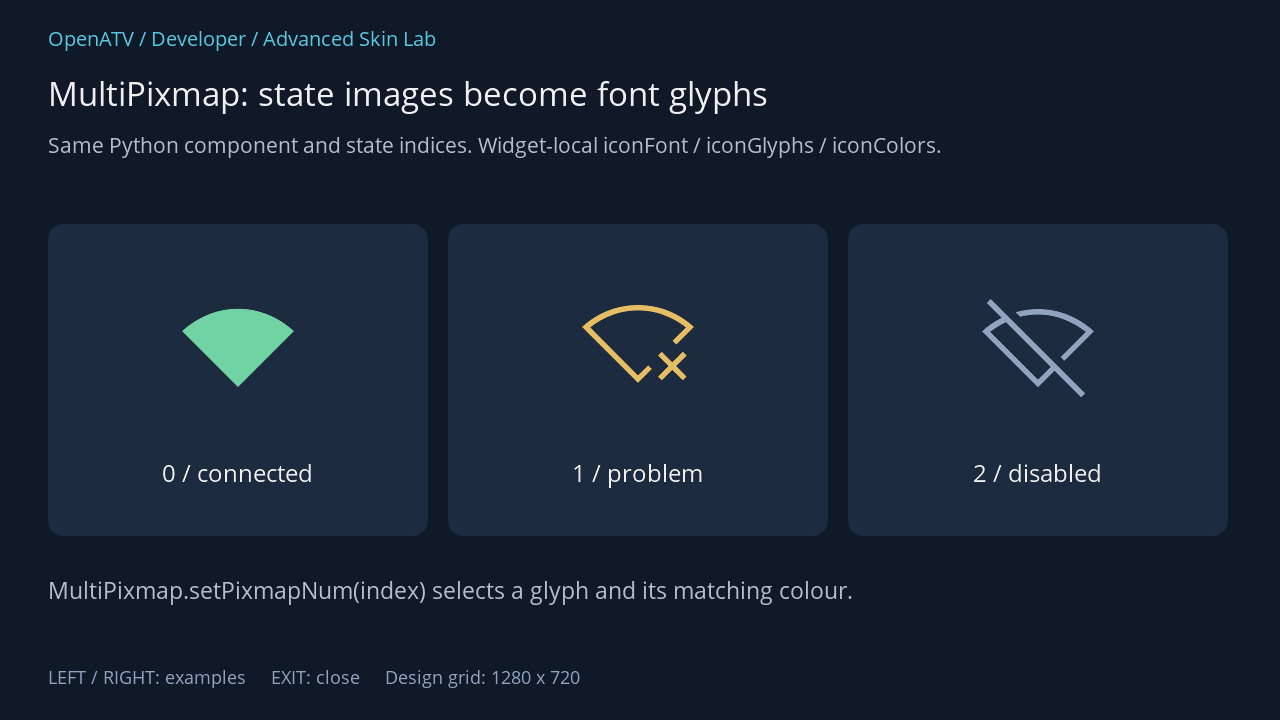
XML used for this result (inside the complete example screen):
<eRectangle position="48,224" size="380,312" backgroundColor="#001C2B40" zPosition="0" cornerRadius="16"/> <widget name="state0" position="76,260" size="324,168" iconFont="enigma2icons;112" iconGlyphs="0xEA77,0xEA78,0xEA79" iconColors="#0078DFAD,#00F3C86A,#0099ADCA" horizontalAlignment="center" verticalAlignment="center" transparent="1" zPosition="2" /><eLabel position="68,456" size="340,52" font="Regular;26" text="0 / connected" foregroundColor="#00FFFFFF" transparent="1" zPosition="2" horizontalAlignment="center"/><eRectangle position="448,224" size="380,312" backgroundColor="#001C2B40" zPosition="0" cornerRadius="16"/> <widget name="state1" position="476,260" size="324,168" iconFont="enigma2icons;112" iconGlyphs="0xEA77,0xEA78,0xEA79" iconColors="#0078DFAD,#00F3C86A,#0099ADCA" horizontalAlignment="center" verticalAlignment="center" transparent="1" zPosition="2" /><eLabel position="468,456" size="340,52" font="Regular;26" text="1 / problem" foregroundColor="#00FFFFFF" transparent="1" zPosition="2" horizontalAlignment="center"/><eRectangle position="848,224" size="380,312" backgroundColor="#001C2B40" zPosition="0" cornerRadius="16"/> <widget name="state2" position="876,260" size="324,168" iconFont="enigma2icons;112" iconGlyphs="0xEA77,0xEA78,0xEA79" iconColors="#0078DFAD,#00F3C86A,#0099ADCA" horizontalAlignment="center" verticalAlignment="center" transparent="1" zPosition="2" /><eLabel position="868,456" size="340,52" font="Regular;26" text="2 / disabled" foregroundColor="#00FFFFFF" transparent="1" zPosition="2" horizontalAlignment="center"/><eLabel position="48,574" size="1184,52" font="Regular;25" text="MultiPixmap.setPixmapNum(index) selects a glyph and its matching colour." foregroundColor="#00BDCADA" transparent="1" zPosition="2" />Download complete icon-states.xml · Download all examples and the test plugin
Attribute reference
Section titled “Attribute reference”| Attribute | Contract |
|---|---|
iconFont |
Font alias and size, for example enigma2icons;72 |
iconGlyphs |
Comma-separated Unicode integers parsed with base detection; use 0xEA77 or decimal values |
iconColors |
Optional comma-separated colour list, exactly one colour per glyph |
Both iconFont and iconGlyphs are needed for glyph mode. iconGlyphs uses numbers, not the literal characters from . Invalid code points (including surrogate values) reject glyph mode and leave the pixmap path available. A colour-list length mismatch uses the widget’s foreground colour instead of per-state colours. An absent glyph in an otherwise valid font is a separate font/content problem; it is not detected by validating the integer.
In glyph mode the component consumes these specialised attributes, removes pixmap/scaling attributes and applies the selected font to a label. Therefore scale="1" is not how a glyph is resized; change the font size and label geometry. A standard Pixmap renderer does not automatically acquire this MultiPixmap interface.
Migrating an existing widget
Section titled “Migrating an existing widget”- Find the Python object’s actual class and every
setPixmapNum()call. - Write down the state order and include every index the owner can select.
- Map each state to a meaningful glyph and colour, preserving its meaning.
- Add the font attributes to that named widget in the skin.
- Exercise all states, including transitions, and verify label size/alignment.
If you retain pixmaps as fallback, ensure the files still exist and match the same state order. A fallback declaration is not proof of compatibility with arbitrary older builds. The documented source and its component implementation define this interface.
Hook-specific styling
Section titled “Hook-specific styling”Specialised component options such as these are handled before the central AttributeParser; that is why iconGlyphs is not one of the general 125 screen attributes. The same principle applies to the classic list’s serviceNameFont and the modern template’s index fields: inspect the component that owns the widget.
Source: MultiPixmap glyph handling.