
Modern channel lists and XML row templates
The modern ServiceList combines the native eListboxPythonServiceContent with a Python entry builder. Its ServiceListTemplateParser reads specialised XML and prepares drawing instructions for each row or card. This is a different interface from both a normal <screen> and the older Python-expression TemplatedMultiContent converter.
A template belongs to a component
Section titled “A template belongs to a component”<template component="serviceList" name="MySkin Compact" fonts="Regular;24,Regular;20"> <mode name="services" itemWidth="900" itemHeight="58" orientation="vertical"> <text index="ServiceName" position="12,4" size="870,32" font="0" foregroundColor="#00FFFFFF" wrap="ellipsis" /> </mode> <mode name="bouquets" itemWidth="900" itemHeight="58" orientation="vertical"> <text index="ServiceName" position="12,4" size="870,32" font="0" foregroundColor="#00FFFFFF" wrap="ellipsis" /> </mode> <mode name="other" itemWidth="900" itemHeight="58" orientation="vertical"> <text index="EntryName" position="12,4" size="870,32" font="0" foregroundColor="#00FFFFFF" wrap="ellipsis" /> </mode></template>component="serviceList" associates the template with this parser. The name is the selectable widget-style identifier. The fonts attribute defines a zero-based font table: font="0" selects Regular;24, and font="1" selects Regular;20. A template text item does not use font="Regular;24" directly.
The three modes
Section titled “The three modes”| Mode | Role |
|---|---|
services |
All-services listing, with service/event handling |
bouquets |
Service entries inside a bouquet, including numbers and event data where available |
other |
Other lists such as directories/providers/bouquets, using entry names |
These are internal list contexts. The word bouquets does not simply mean “the screen currently shows a list of bouquet folder names”. Provide all three modes, and use EntryName for the generic other mode. The parser also derives marker and folder variants from suitable modes and their MarkerName, FolderName, MarkerImage and FolderImage fields.
The elements inside a mode
Section titled “The elements inside a mode”| Element | Draws |
|---|---|
<text> |
A named field or static text, using a font-table index |
<pixmap> |
A picon, capability/status image, optional event image or static pixmap |
<progress> |
Event progress, normally with index="Progress" |
<rectangle> |
Row/card decoration, border, rounded corner or gradient |
<panel> |
Local template layout group, such as horizontal allocation |
Positions are relative to the item or nested template panel, not the whole television screen. Draw decoration before text; template item order determines paint order. Screen zPosition is not a substitute for ordering row drawing instructions.
Native compact-row example
Section titled “Native compact-row example”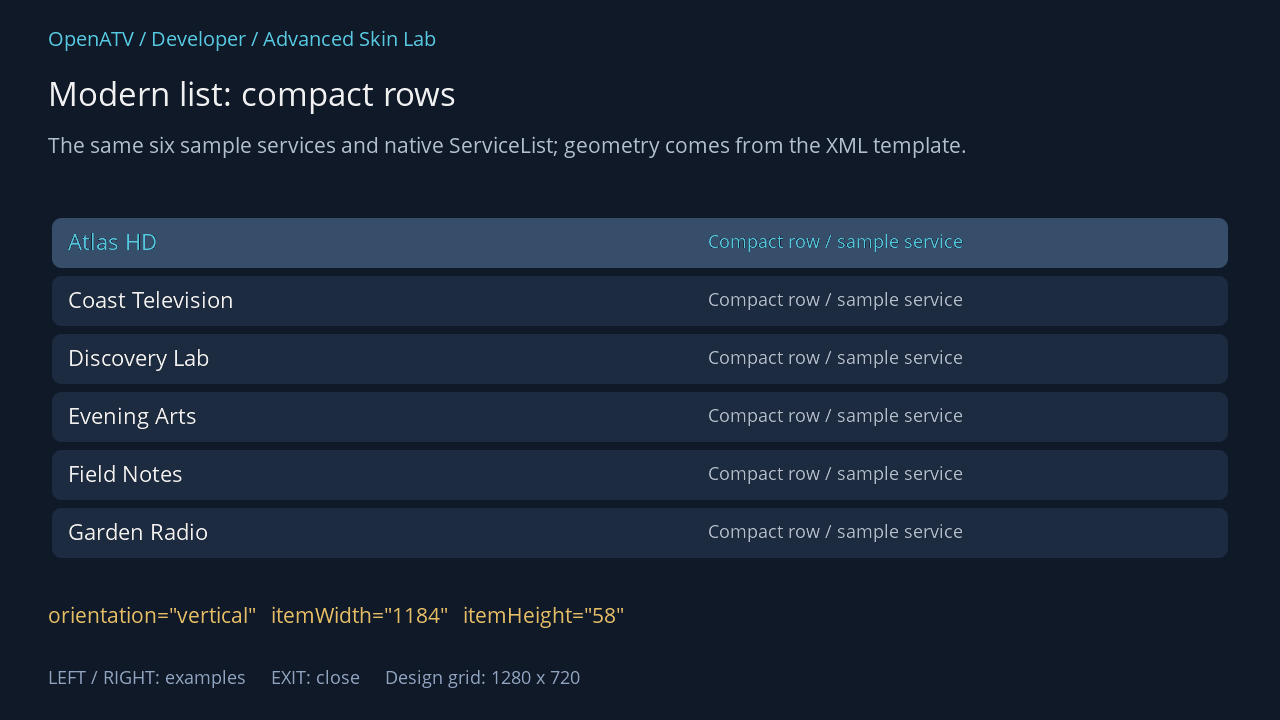
XML used for this result (inside the complete example screen):
<widget name="list" position="48,214" size="1184,360" backgroundColor="#00101928" foregroundColor="#00FFFFFF" backgroundColorSelected="#00101928" foregroundColorSelected="#005BD4EC" scrollbarMode="showNever"> <templates> <template component="serviceList" name="HandbookVertical" fonts="Regular;24,Regular;20"> <mode name="services" itemWidth="1184" itemHeight="58" orientation="vertical"> <rectangle position="4,4" size="1176,50" foregroundColor="#001C2B40" foregroundColorSelected="#00364E69" cornerRadius="10" /> <text index="ServiceName" position="20,12" size="560,34" font="0" foregroundColor="#00FFFFFF" foregroundColorSelected="#005BD4EC" wrap="ellipsis" /> <text position="660,14" size="490,30" font="1" text="Compact row / sample service" foregroundColor="#00BDCADA" /> </mode><mode name="bouquets" itemWidth="1184" itemHeight="58" orientation="vertical"> <rectangle position="4,4" size="1176,50" foregroundColor="#001C2B40" foregroundColorSelected="#00364E69" cornerRadius="10" /> <text index="ServiceName" position="20,12" size="560,34" font="0" foregroundColor="#00FFFFFF" foregroundColorSelected="#005BD4EC" wrap="ellipsis" /> <text position="660,14" size="490,30" font="1" text="Compact row / sample service" foregroundColor="#00BDCADA" /> </mode><mode name="other" itemWidth="1184" itemHeight="58" orientation="vertical"> <rectangle position="4,4" size="1176,50" foregroundColor="#001C2B40" foregroundColorSelected="#00364E69" cornerRadius="10" /> <text index="EntryName" position="20,12" size="560,34" font="0" foregroundColor="#00FFFFFF" foregroundColorSelected="#005BD4EC" wrap="ellipsis" /> <text position="660,14" size="490,30" font="1" text="Compact row / sample service" foregroundColor="#00BDCADA" /> </mode> </template> </templates> </widget> <eLabel position="48,600" size="1184,44" font="Regular;23" text="orientation="vertical" itemWidth="1184" itemHeight="58"" foregroundColor="#00F3C86A" transparent="1" zPosition="2" />Download complete service-rows.xml · Download all examples and the test plugin
The lab embeds <templates> inside its named list widget so the downloaded example is self-contained. Its helper selects that template in a temporary registry while parsing, restoring the original registry before the GUI event loop resumes. A local information adapter declares the sample entries playable and unencrypted; it performs no RF or entitlement check. This isolates the demonstration from the user’s global style choice and tuner state. A production skin uses the normal template loading and style-selection paths.
Add real event fields
Section titled “Add real event fields”Inside a production services or bouquets mode, the following fragment displays the first event title and progress when event data is available:
<text index="Title1" position="330,4" size="540,32" font="1" foregroundColor="#00BDCADA" wrap="ellipsis" /><progress index="Progress" position="330,40" size="540,6" foregroundColor="#005BD4EC" backgroundColor="#00344760" borderWidth="0" />Title1 selects the first event, Title2 the next, and TitleP the configured primetime event. Progress is the current-event progress field and has no event-number suffix in this interface. These names are interpreted by the service-list parser; they are not converter class names.
An empty EPG leaves event-dependent elements empty. Keep the service name useful on its own. Optional event artwork requires a registered provider; merely declaring Image1 does not download artwork. See the field reference.
Source: ServiceListTemplateParser and modern ServiceList, TemplateParser.