
Channel-list screen styles, widget styles and grids
OpenATV separates the screen style from the widget style. The screen determines where the list, event description, title and buttons sit. The widget template determines how each list entry is drawn. A wide screen with compact rows and the same screen with large cards can therefore share most of their surrounding layout.
Register a screen variant
Section titled “Register a screen variant”<!-- In the skin's normal screen definitions. --><screen name="MySkinChannelWide" base="ChannelSelection" label="MySkin wide channel list" position="0,0" size="1280,720" resolution="1280,720" title="Channel Selection"> <widget name="list" position="40,100" size="800,540" scrollbarMode="showOnDemand" /> <widget source="Service" render="Label" position="870,100" size="370,70" font="Regular;26"> <convert type="ServiceName">Name</convert> </widget> <widget source="Event" render="Label" position="870,190" size="370,340" font="Regular;22"> <convert type="EventInfo">FullDescription</convert> </widget></screen>This is a small layout example, not a complete replacement for all buttons/help widgets of a finished skin. base="ChannelSelection" makes the screen discoverable by refreshChannelSelectionStyleChoices() when service-list templates are available; it does not copy the XML children of ChannelSelection. label is the human-readable choice text. The selected screen name is stored in config.channelSelection.screenStyle.
The production owner updates local Service and Event sources when the highlight moves. Use those for the detail area. session.CurrentService would describe the playing channel instead of necessarily describing the highlighted row.
Register the widget styles
Section titled “Register the widget styles”The normal dedicated template file is skinTemplates.xml in the active skin’s directory. It contains a wrapper such as <skin> with direct <template component="serviceList" ...> children. A skinUserTemplates.xml found through the GUI-skin resolver supplies additional/overriding templates.
<skin> <template component="serviceList" name="MySkin Compact" fonts="Regular;24,Regular;20"> <!-- services, bouquets and other modes go here --> </template> <template component="serviceList" name="MySkin Cards" fonts="Regular;26,Regular;20"> <!-- the same modes, with card geometry --> </template></skin>If no dedicated template files are found, the loader scans registered screens for widget/templates/template. These are alternative loading paths: once dedicated files are present, do not assume embedded definitions will also be collected. Templates are keyed by component and name; a later definition of the same name replaces the earlier one. Use a skin-specific name to avoid unintended collisions.
The chosen template name is config.channelSelection.widgetStyle. An empty screen or widget style selects the legacy list. The normal channel-list setup manages these choices; keep XML names stable so saved choices remain meaningful after an update.
Change rows into cards
Section titled “Change rows into cards”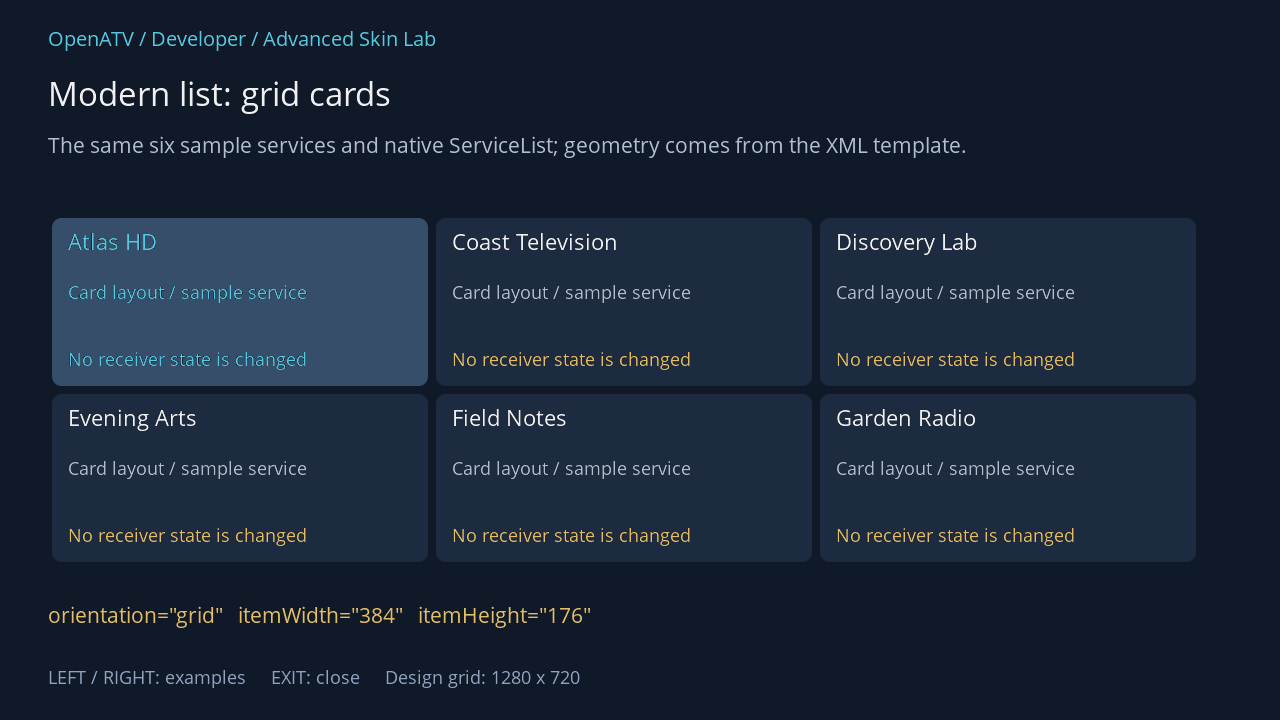
XML used for this result (inside the complete example screen):
<widget name="list" position="48,214" size="1184,360" backgroundColor="#00101928" foregroundColor="#00FFFFFF" backgroundColorSelected="#00101928" foregroundColorSelected="#005BD4EC" scrollbarMode="showNever"> <templates> <template component="serviceList" name="HandbookGrid" fonts="Regular;24,Regular;20"> <mode name="services" itemWidth="384" itemHeight="176" orientation="grid"> <rectangle position="4,4" size="376,168" foregroundColor="#001C2B40" foregroundColorSelected="#00364E69" cornerRadius="10" /> <text index="ServiceName" position="20,12" size="344,34" font="0" foregroundColor="#00FFFFFF" foregroundColorSelected="#005BD4EC" wrap="ellipsis" /> <text position="20,65" size="344,58" font="1" text="Card layout / sample service" foregroundColor="#00BDCADA" wrap="wrap" /> <text position="20,132" size="344,26" font="1" text="No receiver state is changed" foregroundColor="#00F3C86A" /> </mode><mode name="bouquets" itemWidth="384" itemHeight="176" orientation="grid"> <rectangle position="4,4" size="376,168" foregroundColor="#001C2B40" foregroundColorSelected="#00364E69" cornerRadius="10" /> <text index="ServiceName" position="20,12" size="344,34" font="0" foregroundColor="#00FFFFFF" foregroundColorSelected="#005BD4EC" wrap="ellipsis" /> <text position="20,65" size="344,58" font="1" text="Card layout / sample service" foregroundColor="#00BDCADA" wrap="wrap" /> <text position="20,132" size="344,26" font="1" text="No receiver state is changed" foregroundColor="#00F3C86A" /> </mode><mode name="other" itemWidth="384" itemHeight="176" orientation="grid"> <rectangle position="4,4" size="376,168" foregroundColor="#001C2B40" foregroundColorSelected="#00364E69" cornerRadius="10" /> <text index="EntryName" position="20,12" size="344,34" font="0" foregroundColor="#00FFFFFF" foregroundColorSelected="#005BD4EC" wrap="ellipsis" /> <text position="20,65" size="344,58" font="1" text="Card layout / sample service" foregroundColor="#00BDCADA" wrap="wrap" /> <text position="20,132" size="344,26" font="1" text="No receiver state is changed" foregroundColor="#00F3C86A" /> </mode> </template> </templates> </widget> <eLabel position="48,600" size="1184,44" font="Regular;23" text="orientation="grid" itemWidth="384" itemHeight="176"" foregroundColor="#00F3C86A" transparent="1" zPosition="2" />Download complete service-grid.xml · Download all examples and the test plugin
orientation="vertical", horizontal and grid affect native list navigation as well as placement. itemWidth and itemHeight define the item geometry; the list widget defines the viewport. For a grid, choose widths and heights that fit useful whole cards inside that viewport. Reserve space for a scrollbar when enabled, and verify the final row/column at each supported resolution.
Do not merely enlarge a row background: move its text/picon/progress fields into the new card coordinate system too. Keep the selected card legible, including the combinations selected+marked, selected+recording and selected+unavailable.
Respect user options
Section titled “Respect user options”The template parser can exclude Number, Picon, ServiceTypeImage, CryptoImage and RecordingIndicator based on channel-list settings. The picon ratio can adjust the width derived from its height. In all-services mode, number visibility also depends on the numbering mode. Design the surrounding layout so an excluded field does not destroy readability.
Using a template panel can help allocate groups. A normal named screen panel is a separate reuse mechanism and cannot simply be pasted into a row template.
Refresh and maintain
Section titled “Refresh and maintain”The template registry records file modification times for dedicated template files. Supported UI refresh paths can reload template definitions. Changes to a full screen’s widget composition or imported Python code still require recreating that screen, and a GUI restart is a reliable development boundary. Test classic fallback as well as both selected style names.
Source: style discovery, template loading, ChannelSelection ownership.