
Skinning the classic channel list
The classic channel list uses ServiceListLegacy and the native eListboxServiceContent. It is a specialised named GUI component. You cannot position each service row by adding ordinary screen labels beside name="list": those labels would belong to the screen, not repeat for every service.
When Enigma2 selects the classic list
Section titled “When Enigma2 selects the classic list”ChannelSelectionBase constructs ServiceListLegacy when either config.channelSelection.screenStyle or config.channelSelection.widgetStyle is empty. Otherwise it constructs the modern ServiceList. Other selection dialogs may explicitly request the legacy component regardless of the main channel-list preference.
This matters when changing an attribute: first establish which component the owner actually creates. Both components may be named list, but their specialised styling interfaces differ.
The native classic result
Section titled “The native classic result”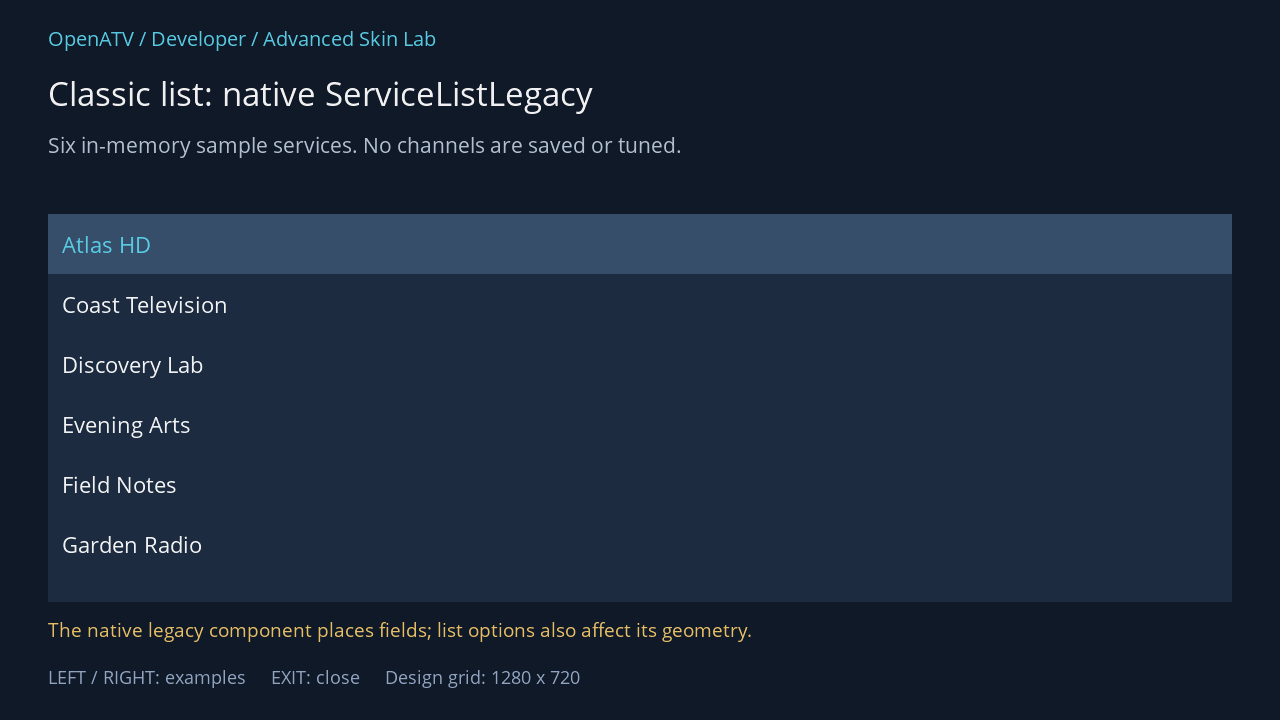
XML used for this result (inside the complete example screen):
<widget name="list" position="48,214" size="1184,388" backgroundColor="#001C2B40" foregroundColor="#00FFFFFF" backgroundColorSelected="#00364E69" foregroundColorSelected="#005BD4EC" serviceNameFont="Regular;24" serviceInfoFont="Regular;20" serviceNumberFont="Regular;22" colorServiceDescription="#00BDCADA" foregroundColorServiceNotAvail="#00FFFFFF" fieldMargins="18" listMarginLeft="14" listMarginRight="14" scrollbarMode="showNever" /> <eLabel position="48,616" size="1184,34" font="Regular;21" text="The native legacy component places fields; list options also affect its geometry." foregroundColor="#00F3C86A" transparent="1" zPosition="2" />Download complete service-legacy.xml · Download all examples and the test plugin
Normally a Python owner creates self["list"] = ServiceListLegacy(self). The lab uses a small subclass that fixes only the teaching row height. The XML styles that object through name="list". In a production ChannelSelection, the component already exists; a skin does not need to create another one.
Fonts, spacing and progress
Section titled “Fonts, spacing and progress”| Attributes | What they control |
|---|---|
serviceNameFont, serviceInfoFont, serviceNumberFont, progressInfoFont |
Font family and base size for the corresponding fields |
fieldMargins, itemsDistances |
Spacing between the native fields/items |
listMarginLeft, listMarginRight |
Interior space at the list edges |
nonplayableMargins |
Native spacing for unavailable-service presentation |
progressBarWidth, progressbarHeight, progressbarBorderWidth |
Geometry of the classic event-progress indicator |
picServiceEventProgressbar |
Image asset for the classic event-progress element |
serviceItemHeight |
Parsed component attribute; later items-per-page calculations can replace the resulting height |
Case matters: progressBarWidth and progressbarHeight deliberately have different capitalisation in the implementation.
The owner and user preferences also shape the list. setItemsPerPage() derives row height from the available list height and the configured row count. Font-size offsets are added to the base fonts. Two-line mode, picons, numbering, progress placement and service-type/recording indicators change field allocation. A hard-coded XML height is therefore not the sole source of the final classic row geometry.
Colour states
Section titled “Colour states”| Group | Specialised classic attributes |
|---|---|
| Marked entries | foregroundColorMarked, foregroundColorMarkedSelected, backgroundColorMarked, backgroundColorMarkedSelected |
| Unavailable service | foregroundColorServiceNotAvail |
| Event text | foregroundColorEvent, colorServiceDescription; selected equivalents foregroundColorEventSelected, colorServiceDescriptionSelected |
| Event-text outline | foregroundColorEventborder, foregroundColorEventborderSelected |
| Progress | colorEventProgressbar, colorEventProgressbarSelected, colorEventProgressbarBorder, colorEventProgressbarBorderSelected |
| Recording/streaming | colorServiceRecorded, colorServicePseudoRecorded, colorServiceStreamed, colorServiceRecording |
| Fallback service | colorFallbackItem, colorServiceSelectedFallback, colorServiceDescriptionFallback, colorServiceDescriptionSelectedFallback |
| Advertisement state | colorServiceWithAdvertisment |
Normal list background, foreground, selection colours and scrollbar geometry also pass through the general widget skinning path. Test selected, marked, recorded and unavailable entries against the chosen background. A marked entry is an editing/selection state; it is not the same as the current cursor highlight.
Migrating a classic design
Section titled “Migrating a classic design”Preserve the overall screen first: title, list rectangle, event-detail area and button labels. Then replace the row design with a modern template. Do not copy the classic serviceNameFont, progressBarWidth and event-colour attributes and expect the modern component to translate every value: its applySkin() explicitly ignores many legacy attributes. Fonts and most item geometry move into the modern row template.
Source: ServiceListLegacy, component selection.